
July 31, 2026
7 Signs Someone Has Already Stolen Your Credentials (And How to Detect It)
Passwords remain one of the most common ways attackers gain access to corporate systems. While organizations have made significant progress with Multi-Factor Authentication (MFA), password managers, and stronger access policies, compromised credentials continue to be a leading cause of security incidents. As cybersecurity regulations such as NIS2 place greater emphasis on risk management, identity security, and incident detection, identifying compromised accounts quickly has become both a security and compliance priority.
The challenge is that credential theft is often silent. An attacker doesn’t always need to “hack” a system—they simply log in using valid credentials. By the time a user notices something is wrong, sensitive data may already have been accessed, privileged accounts abused, or persistence established.
Fortunately, attackers leave traces. Modern identity providers, VPNs, endpoint telemetry, and SIEM platforms generate a wealth of authentication data that can reveal suspicious behavior long before a breach becomes public.
In this article, we’ll look at seven common indicators of compromised credentials, explain how they can be detected in a SOC, and review practical steps to strengthen password security, and overall identity protection while supporting compliance with EU directives like NIS2 or international frameworks, such as NIST/NIST2.
How to detect Password compromise
1. Impossible Travel
A user successfully authenticates from London at 09:00 and then from Singapore twenty minutes later.
This type of impossible travel indicates potential session hijacking. (Note that closed-countries (with heavily restricted and censored internet access) like China will often make connections from proxies located in nearby countries, such as Singapore domains.)
How to detect this in your SIEM:
- Firewall logins
- Source IP addresses
- Geolocation
- Time between authentications
Many SIEM platforms already include “Impossible Travel” analytics, but they should be tuned to ignore trusted VPN gateways and known corporate exit nodes.
Investigation steps
- Review device information (It can indicate the same corporate device using a VPN).
- Review VPN usage or scheduling from the company policy.
- Compare browser fingerprints.
- Determine whether the original session remains active.
2. Login From an Anonymous or Suspicious VPN
Attackers most often route authentication through:
- Anonymous VPN services
- Residential proxies
- TOR exit nodes
- Hosting providers
These connections are not inherently malicious, but they increase the likelihood of credential abuse.
How to detect this in your SIEM:
Correlate login IPs with internal intelligence or OSINT tools like Logstail CTI to find:
- Threat intelligence feeds
- Known VPN providers
- TOR exit node lists
- Cloud hosting providers
- IP reputation databases
If this type of behavior is combined with impossible travel or a new device, it should raise another flag of suspicion.
3. Password Reset Followed by Privileged Activity
A password reset is often a legitimate event. However, when it’s immediately followed by:
- Privileged role assignments
- Mail forwarding rules
- New API keys
- Data exports
- Administrative actions
it can indicate account takeover.
How to detect this in your SIEM:
Correlate password reset events with subsequent activity, including:
- Successful authentication: A login occurring shortly after the password reset, especially from a new IP address, device, or geographic location.
- Privilege escalation: New role assignments, elevated permissions, group membership changes, or administrative actions.
- Persistence mechanisms: New API keys, OAuth applications, mail forwarding rules, or other changes that could allow continued access.
- Sensitive resource access: Access to privileged systems, confidential files, administrative consoles, or large volumes of data.
- Data movement: Unusual downloads, exports, or transfers occurring shortly after the reset.
The shorter the time between the password reset and subsequent privileged activity, the higher the risk score should be. A reset followed by several high-risk actions within minutes is significantly more suspicious than the same activity occurring over several days.
4. Session Hijacking Indicators
An attacker never actually needs your password if they steal your authenticated session. This type of attack occurs through:
- Malware and infostealers that may have been installed on your computer.
- Cross-site scripting (XSS) attacks that may steal your browser cookies.
- Insecure networks, which can allow packet sniffing. Ensure yours is safely configured.
- Phishing (learn about proper phishing security on Logstail’s phishing security blog).
- Bad or rogue browser extensions that can facilitate this attack.
How to detect this in your SIEM:
- New IP address during an existing session
- Sudden change in browser characteristics
- Access without a recent authentication event
- Simultaneous activity from different regions
- Unusual token reuse
Because session hijacking bypasses authentication, endpoint telemetry often becomes just as important as identity logs.
5. Unusual Authentication Patterns
Attackers most often exhibit patterns that differ from legitimate users, even when the credentials used are valid. Common indicators include:
- Logins outside normal working hours
- Access to systems the user has never previously accessed
- Multiple failed authentication attempts followed by a successful login
- High-frequency API authentication requests
- Logins from unfamiliar countries or regions
How to detect this in your SIEM:
Correlate authentication logs with historical user activity to identify deviations. You can look for the above indicators in your Firewall SIEM or custom Dashboard.
Behavioral analytics and User and Entity Behavior Analytics (UEBA) are particularly effective for detecting these subtle deviations. When unusual authentication patterns are combined with other indicators—such as anonymous VPN usage, impossible travel, or a previously unseen device—the likelihood of credential compromise increases significantly.
6. Security Controls Suddenly Change
One of the first objectives after compromising an account is weakening security.
How to detect this in your SIEM:
Watch logging for:
- MFA getting disabled
- Recovery email being changed
- New authentication methods registered
- Conditional Access policies modified
- Security alerts dismissed or logs being deleted
- Audit logging disabled
These events should generate high-severity SOC alerts by themselves.
7. MFA Was Successful From a Brand-New Device
Successful MFA is good—but only when it’s expected. If a user suddenly authenticates from a never-before-seen device immediately after enrolling a new authenticator or approving a push notification, this deserves investigation.
Possible causes include:
- MFA fatigue attacks
- AiTM phishing
- Compromised credentials
- Stolen session tokens
How to detect this in your SOAR:
Since, this behavior is highly significant, it would be best to automatically alert for it. Alerts should look for:
- MFA succeeding on a previously unseen device.
- Device trust missing.
- Browser fingerprint differing significantly from the authenticating device.
- Device compliance checks failing.
Best password practices
Reduce the risk of credential theft and password compromise by following proven preactive password security practices. Learn more in our blog post covering a major password mega-leak and practical steps you can take to better protect your accounts.
Read our blog post: The 1.3B Password Megaleak: Your Login Is Probably In There
NIS2 compliance – Passwords
Passwords standards are strictly mandated by law. For the EU, NIS2 in particular legally requires all medium and large organizations operating in critical and important sectors across the European Union (Energy, Healthcare, Finance, Transport, Digital Infrastructure, and Public Administration), to follow a set of security standards. Those organizations ought to implement appropriate cybersecurity risk management measures, including secure authentication and access control. In practice, this means organizations are expected to implement strong password and credential management policies. Even beyond EU jurisdiction, standards are identical. Internationally, organizations commonly follow the U.S. National Institute of Standards and Technology (NIST) guidance, particularly NIST SP 800-63B, which aligns closely with many modern authentication practices encouraged under NIS2 under NIST and NIST2 international frameworks. You can find the full NIS2 directive here.
Article 21 is particularly relevant, as it establishes requirements for credential management, including:
- Multi-Factor Authentication (MFA): Article 21(2)(j) -> MFA must be deployed anywhere its absence could result in a breach (e.g., remote access, admin accounts, email, and cloud environments).
- Access Control and Corporate Policies: Article 21(2)(i) -> A Mandate of MFA and RBAC controls for HR security, access control policies and asset management.
- Cyber Hygiene and Training: Article 21(2)(g) -> Basic Hygiene guidelines as defined by ENISA: long and strong passwords, different passwords per service, and usage of password managers.
For more information on password compliance policies, read the Logstail Academy course for the NIS2 directive. Additionally, read this blog on how Logstail can help you comply with the NIS2 directive.
Businesses don’t have an optional opt-in for password security adherence. For the aforementioned company categories, noncompliance with the NIS2 security standards is met with significant legal liability and penalty up to 10 million euro or 2% of annual turnover.
Detecting credential theft using Logstail
Logstail’s SOAR & SIEM platform which you can find on Logstail’s Security Suite will provide you with all the tools to detect these use-cases indicative of credential theft or insecure events.
- In the SIEM component, by setting up Dashboard interfaces, users can cleanly review suspicious behavior indicative of credential theft, like impossible travel, suspicious/anonymous VPN authentications, and MFAs from brand new devices.
- The SOAR counterpart focuses on quick, overt alerting of suspicious behavior or events such as password resets, security control modification, enumeration and malware.
Alerting Example in Logstail
For instance, we can set an alert for “Password Security Controls Suddenly Change”. It would be suspicious for the Windows admin recovery account to reset its password. Logstail allows us to notify on this event:
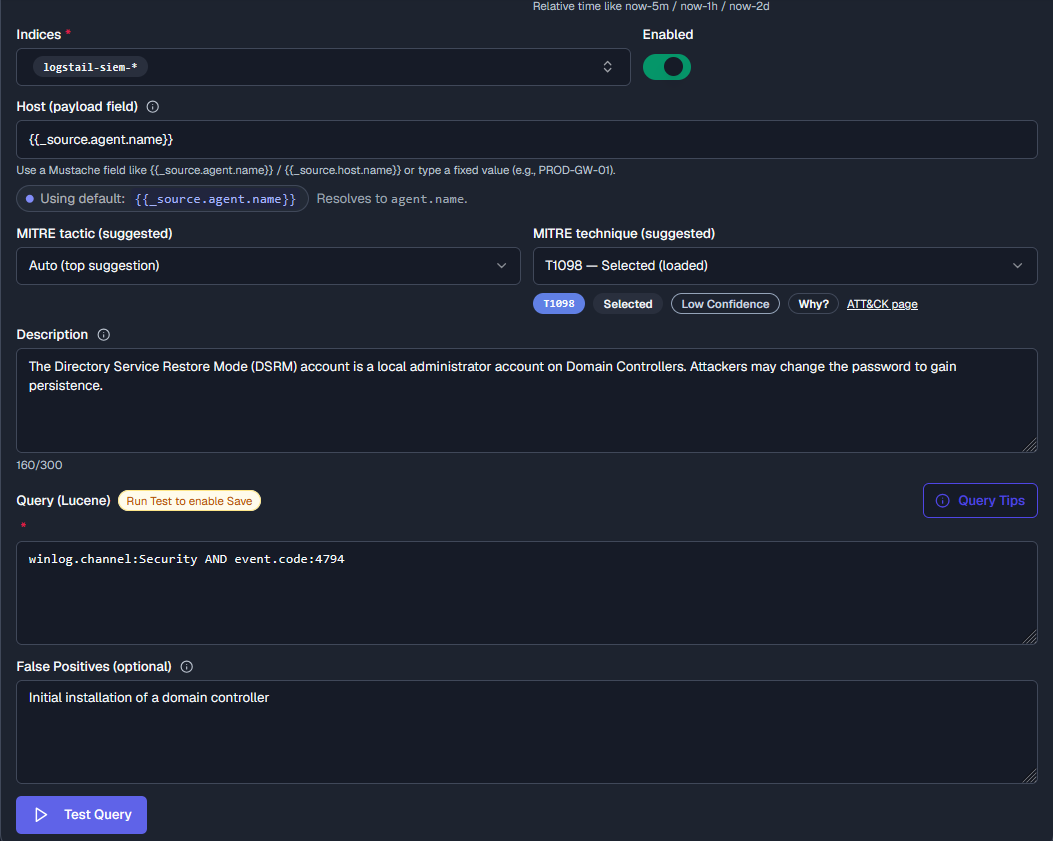
Monitor Query: winlog.channel:Security AND event.code:4794
It is also useful to join this monitor by its respective Mitre Att&ck code; in this instance it is T1098.
This will monitor will record and notify for sets and resets of the DSRM (Directory Services Restore Mode) account. It can detect changes to:
- Minimum password length
- Password history
- Complexity requirements
- Account lockout settings (depending on the change)
This rule will create an alert as instant as the SIEM collection, and will notify your SOC stack with a signal sound cue:

Additional credential theft detection examples:
- Your SIEM should automatically detect and alert for usage of cyberattack tools like mimikatz, DumpCreds. These tools are frequently used in attacks to extract plaintext passwords, hashes, PIN codes, and Kerberos tickets directly from system memory. Make a query that looks for: process.command_line:(*DumpCreds* OR *mimikatz*))
- Make your SIEM alert on usage of uncommon suspicious words or tools that may be associated with security incidents: process.command_line:(*rpc\:\:* OR *token\:\:* OR *crypto\:\:* OR *kerberos\:\:* OR *lsadump\:\:*))
- Alert detection for Password Policy Enumeration (Credential reads): winlog.channel:Security AND (event.code:4661 AND winlog.event_data.AccessList:*%%5392* AND winlog.event_data.ObjectServer:Security\ Account\ Manager)
- Detection rule for Password(s) provided in command-line (This practice exposes sensitive credentials in plaintext across multiple areas of the OS, particularly Shell history logs, which can be quickly utilized by an attacker): process.executable:(*\\net.exe OR *\\net1.exe) AND process.command_line:( *” use “* AND(*”/user:”* OR *”/user “* OR *”/password:”* OR *”/password “*))
Conclusion
Stolen credentials have become one of the most effective ways for attackers to gain unauthorized access while blending in with legitimate user activity. Because these attacks often involve valid accounts rather than malware, organizations must look beyond traditional defenses and continuously monitor for behavioral indicators such as unusual logins, unexpected password resets, and changes to security controls.
By combining strong password practices, along with a strongly NIS2 aligned policy and continuous monitoring, organizations can significantly reduce the risk of credential-based attacks. Logstail helps security teams detect these indicators early, enabling faster investigation and response before compromised accounts can be used for lateral movement or privilege escalation.
Contact Our Experts or Sign Up for Free