July 13, 2026
Detecting Microsoft 365 Device-Code Phishing with Logstail
Microsoft 365 Device-Code Phishing
As organisations strengthen their defences against conventional phishing attacks, device code phishing has emerged as a technique that abuses legitimate Microsoft authentication processes. Rather than relying on counterfeit sign-in pages or spoofed domains, these attacks use trusted services to make malicious requests appear authentic.
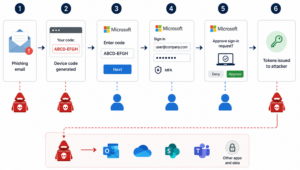
The activity begins with a phishing email designed to persuade the recipient to complete what appears to be a legitimate Microsoft authentication request. Attackers may present the message as a document-sharing invitation, a Microsoft Teams notification, an account verification request, or another routine business communication.
The phishing email provides the context that makes the subsequent authentication request appear credible. The attacker presents the request as a routine business interaction. This increases the likelihood that the recipient will follow the instructions without questioning its legitimacy. In some cases, the attacker may continue the conversation through email or a collaboration platform to reinforce the deception.
The attacker does not direct the victim to a fraudulent sign-in page. Instead, they initiate Microsoft’s legitimate device authentication flow from a session or application under their control. Microsoft generates a temporary device code, which the attacker includes in the phishing email or in a subsequent communication.
The attacker then instructs the recipient to visit Microsoft’s official device authentication portal and enter the provided code. The victim signs in using their Microsoft 365 credentials and completes multi-factor authentication (MFA).
By completing this process, the victim unknowingly authorises the authentication request initiated by the attacker. Microsoft then associates the approved sign-in with the attacker-controlled session and issues valid access and refresh tokens.
The victim enters their credentials and completes MFA on Microsoft’s legitimate infrastructure. The attacker therefore does not need to capture the password or bypass MFA directly. This makes the request appear trustworthy and removes many of the warning signs associated with conventional credential-harvesting attacks.
The attacker can use the issued tokens to access Microsoft 365 services. These may include Outlook, OneDrive, SharePoint, and Microsoft Teams. These tokens may also allow access to organisational data through Microsoft’s identity platform without requiring the victim’s credentials again.
The attacker’s access depends on the permissions assigned to the compromised account. They may read emails, download files, search for sensitive information, create malicious mailbox rules, or maintain persistent access.
The effectiveness of device code phishing lies in its combination of social engineering and trusted infrastructure. The phishing email initiates the attack, while Microsoft’s legitimate authentication flow provides the mechanism through which access is granted.
As a result, the technique may appear more convincing to victims and can be more difficult for traditional phishing controls to identify.
Why Device Code Phishing Is Difficult to Detect
Device code phishing presents a significant detection challenge because much of the authentication process appears legitimate.
The user visits Microsoft’s official sign-in page, enters valid credentials, and successfully completes MFA. From the user’s perspective, the process may appear entirely routine.
Unlike traditional credential-harvesting campaigns, the attack does not necessarily involve a spoofed domain, a cloned website, or a fraudulent sign-in page. Many of the conventional indicators associated with phishing may therefore be absent.
The initial phishing email may also contain no obviously malicious link. Instead, it may direct the recipient to a legitimate Microsoft service and provide a code to enter. This can make the message more difficult for both users and email-security controls to assess.
Security teams cannot therefore rely solely on preventive measures. Effective device code phishing detection requires visibility before, during, and after authentication.
Analysts should monitor for indicators such as:
- Sign-ins from unfamiliar IP addresses or geographical locations
- Authentication through unusual applications or device code authentication flows
- Access from previously unseen devices
- Abnormal Microsoft 365 or mailbox activity
- Large or unexpected downloads from OneDrive or SharePoint
- Suspicious inbox or email forwarding rules
- OAuth consent granted to unfamiliar applications
- Activity that differs significantly from the user’s normal behaviour
A single event may not be sufficient to confirm an attack. However, several related events occurring within the same timeframe may indicate that an account has been compromised.
Security teams should therefore correlate identity, endpoint, network, email, and cloud activity. This enables analysts to reconstruct the sequence of events, identify post-compromise behaviour, and respond before sensitive information is exposed.
Detecting Suspicious Microsoft 365 Activity with Logstail
The Logstail SIEM & SOAR platform helps security teams collect and correlate Microsoft 365 activity with identity, endpoint, firewall, email, and network logs.
Before producing alerts, Logstail SIEM & SOAR collects Microsoft 365 telemetry such as sign-in events, audit activity, Exchange Online logs, SharePoint and OneDrive activity, Microsoft Teams events, application usage, user actions, and source IP addresses.
The platform then normalises and correlates these events so analysts can review Microsoft 365 activity across users, applications, services, and time periods. This log-first approach provides the context required to distinguish isolated events from a wider pattern of suspicious behaviour.
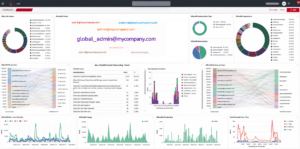
This visibility is particularly important in device code phishing investigations because no single event may provide conclusive evidence of compromise. The phishing email, authentication activity, token use, file access, and mailbox behaviour must often be reviewed together.
Once the relevant logs have been collected and correlated, Logstail SIEM & SOAR applies detection logic to identify suspicious authentication attempts and post-compromise activity associated with device code phishing.
For example, Logstail can generate several high-severity Office 365 Abnormal Login alerts alongside Suspicious Office 365 File Download Activity Detected alerts.
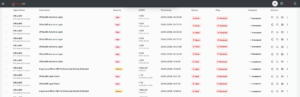
Repeated abnormal sign-ins combined with unexpected file downloads may indicate that an account has been compromised. They may also suggest that an attacker is actively collecting organisational data.
Logstail SIEM & SOAR enables analysts to review these events within a single correlated timeline. This provides greater context than examining each alert in isolation and helps investigators understand how the activity developed from the initial phishing email to subsequent account access.
By connecting authentication events with cloud, endpoint, and network activity, analysts can assess the scope of the compromise more effectively and prioritise the appropriate response.
Example Detection and Response Sequence
Once the victim has approved the attacker-controlled authentication request, the incident may progress through the following stages:
- Microsoft issues access and refresh tokens to the attacker-controlled session.
- The attacker gains access to the user’s Microsoft 365 account.
- Logstail SIEM & SOAR collects and correlates the resulting sign-in, mailbox and cloud activity.
- Logstail detects an abnormal Microsoft 365 sign-in.
- The attacker accesses Outlook, OneDrive, SharePoint or Microsoft Teams.
- Logstail detects suspicious file-download or mailbox activity.
- The Security Operations Centre reviews the correlated events and begins its investigation.
- Response actions may include revoking active sessions, blocking further sign-ins, resetting credentials, reviewing MFA settings and investigating accessed files.
Analysts should also review the original phishing email to identify additional recipients, related infrastructure, and indicators that may reveal a broader campaign.
Automated Response with Logstail Playbooks and Microsoft 365 Integrations
Logstail SIEM & SOAR can integrate with Microsoft 365 to support both automated response and analyst-led containment. Through this integration, Logstail can perform actions such as revoking active sessions, blocking sign-ins, forcing password resets, searching mailboxes, removing malicious messages and sending notifications through Microsoft Teams.
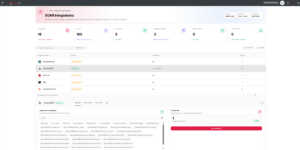
These integration actions can also be used within Logstail playbooks. In the example below, a high-severity Office 365 Abnormal Login alert triggers two immediate actions. Logstail first revokes the affected user’s active Microsoft 365 sessions, then sends the incident details to the SOC through Microsoft Teams for further investigation.
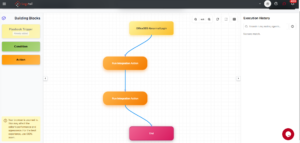
Revoking active sessions interrupts access associated with the suspicious authentication event and invalidates the attacker’s current session tokens. This provides an immediate containment measure without automatically disabling the account.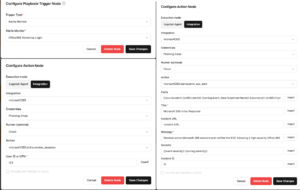
This distinction is important because an abnormal login does not always confirm malicious activity. A legitimate user may sign in from a new device, network or geographical location. By revoking the active session and notifying the SOC, the playbook limits potential attacker access while allowing analysts to validate the event before applying more disruptive measures.
If the SOC confirms account compromise, analysts can use additional Microsoft 365 integration actions directly from Logstail SIEM & SOAR, including:
- Blocking further sign-ins
- Disabling the affected account
- Forcing a password reset
- Searching the mailbox for related phishing messages
- Removing malicious emails
- Revoking public sharing permissions
- Creating an incident war room in Microsoft Teams
This approach combines automated initial containment with analyst-led remediation, allowing security teams to respond quickly while reducing the risk of unnecessarily locking out legitimate users.
Improving Detection Skills with Logstail Cybersecurity Academy
Technical detection should be complemented by continuous analyst training and user awareness.
Users should understand that a request can still be malicious even when it directs them to an official Microsoft website. They should question unexpected authentication requests, particularly when asked to enter a device code provided by another person.
The Logstail Cybersecurity Academy helps organisations strengthen their ability to detect, investigate and respond to identity-based attacks.
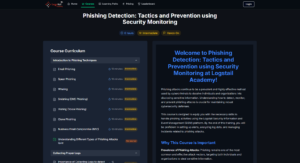
The Phishing Detection: Tactics and Prevention using Security Monitoring course provides analysts with practical experience identifying phishing attacks through log analysis and security monitoring. The course covers common phishing techniques, business email compromise (BEC), phishing-related log collection, and SIEM-based investigations, helping analysts recognise how seemingly legitimate authentication activity may be part of a wider attack.
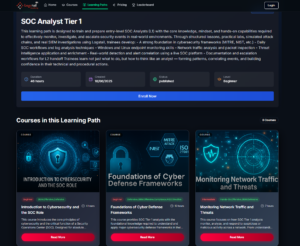
For analysts responsible for Microsoft 365 investigations, the SOC Analyst Tier 1 Learning Path further develops practical skills in:
- Investigating events
- Identifying abnormal authentication behaviour
- Reviewing cloud file-access activity
- Analysing suspicious email activity
- Correlating identity, endpoint and network logs
- Responding to compromised accounts
- Building and tuning SIEM detection rules
Together, these training programmes help analysts understand the complete attack lifecycle, from the initial phishing email through authentication, post-compromise activity and incident response, enabling organisations to improve both detection and response capabilities.
Final Thoughts
Microsoft 365 device code phishing demonstrates how attackers can combine phishing emails with trusted authentication infrastructure to gain access to user accounts.
The attack begins with social engineering. A phishing email establishes the context, builds trust, and persuades the victim to complete an authentication request. The attacker then abuses Microsoft’s legitimate device code flow to obtain access and refresh tokens.
Because the victim signs in through Microsoft’s official infrastructure and completes MFA successfully, the activity may appear legitimate at first.
Security teams therefore need visibility beyond the initial sign-in. They must monitor the complete sequence of activity, from the phishing email and authentication flow to post-compromise behaviour across Microsoft 365 services.
Logstail SIEM & SOAR helps organisations collect and correlate email, authentication, endpoint, network, and cloud events. It also supports automated response through playbooks and Microsoft 365 integrations, allowing teams to revoke suspicious sessions, notify the SOC, and apply further containment actions when analysts confirm malicious activity.
The Logstail Cybersecurity Academy strengthens this capability through practical training. Courses such as Phishing Detection: Tactics and Prevention using Security Monitoring, together with the SOC Analyst Tier 1 Learning Path, help analysts recognise phishing activity, investigate identity-based attacks, and respond to compromised accounts with greater confidence.
Together, Logstail SIEM & SOAR and the Logstail Cybersecurity Academy provide security teams with the visibility, response capabilities, and practical skills needed to manage Microsoft 365 identity threats more effectively.