
November 11, 2026
When Trusted Workplace Tools Become Phishing Traps: The Risks Behind Fake Meeting Links
Introduction
Cybercriminals are exploiting familiar workplace platforms such as Microsoft Teams and Google Meet to create convincing phishing pages. Two recent discoveries reveal how everyday meeting tools can become opportunities for credential theft.
A meeting invitation arrives in your inbox. It appears to be from Microsoft Teams or Google Meet, the platforms you use almost every day. The branding looks familiar, the page appears legitimate, and all you need to do is sign in to join the meeting. But what if the meeting page is fake?
Cybercriminals are increasingly exploiting the trust people place in workplace communication tools, creating fraudulent websites that imitate familiar platforms and trick users into revealing sensitive login information. Unlike traditional phishing emails filled with obvious spelling mistakes or suspicious requests, these attacks can appear as ordinary workplace interactions.
Recent discoveries involving fake Google Meet and Microsoft Teams websites, reported in October 2026, highlight how convincing these phishing attempts can become. They also reveal a growing challenge for businesses: the same tools that make everyday communication easier can provide attackers with believable disguises.
Why Trusted Workplace Tools Are Becoming Phishing Targets
Microsoft Teams and Google Meet have become essential to modern workplaces. Employees rely on them to attend meetings, collaborate with colleagues, communicate with customers, and connect with external partners. Meeting invitations, calendar notifications, and sign-in requests have become so routine that people often interact with them without much hesitation.
This familiarity is exactly what makes these platforms attractive to cybercriminals. Rather than persuading someone to visit an unknown website, attackers can create a page that resembles a service the user already trusts. A familiar logo, professional design, and realistic sign-in form can make a malicious page appear authentic.
The attack does not necessarily involve hacking Microsoft Teams or Google Meet themselves. Instead, cybercriminals exploit the trust associated with these brands to manipulate users into handing over their credentials.
This technique is known as brand impersonation phishing, and its effectiveness depends on a simple assumption: people are more likely to trust something they recognize.
A familiar logo can make a phishing website look legitimate, but it cannot prove who controls it.
How Fake Meeting Links Turn Into Phishing Traps
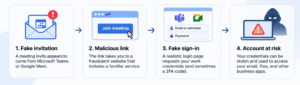
Imagine receiving a meeting invitation from someone claiming to be a colleague, customer, or business partner. The invitation contains a link that appears to lead to a familiar video conferencing service. After clicking it, you are presented with a realistic sign-in page requesting your work email address and password.
Everything appears normal, except for one critical detail: the website belongs to an attacker, not the organization it claims to represent.
Once credentials are entered, they may be collected and used to attempt unauthorized access to the victim’s real account. Some phishing websites also try to capture verification codes used during two-factor authentication (2FA).
The process typically begins with a deceptive link or invitation, followed by a convincing imitation of a legitimate service. The attacker then attempts to obtain login information, which may be used to compromise the account or support further attacks.
What makes these attempts particularly concerning is that users may not immediately notice anything unusual. A fake page can display familiar branding, realistic buttons, and plausible instructions while quietly collecting sensitive information.
And because many employees use the same Google or Microsoft identities across several business applications, the potential consequences can extend well beyond a single online meeting.
Recent Cases: Google Meet and Microsoft Teams Impersonated
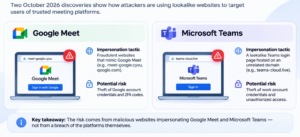
Two separate discoveries reported in October 2026 demonstrate how cybercriminals are exploiting the popularity of workplace collaboration platforms. Although there is no confirmed connection between the cases, both illustrate the same underlying threat: phishing websites designed to take advantage of users’ familiarity with trusted services.
Fake Google Meet Pages Target Google Account Credentials
On October 19, 2026, Anurag(@Malwarehunter) identified reported the discovery of two fraudulent websites impersonating Google Meet. The domains, identified as meet-google[.]cyou and qooglo[.]com, resembled Google-related addresses but were not associated with the legitimate Google Meet service.
According to the reported findings, the pages were designed to steal Google account credentials and support phishing involving two-factor authentication codes. The researcher also identified an exposed installation page on one of the websites that revealed configuration details, raising additional concerns about how the malicious infrastructure was set up.
The danger extends beyond access to video meetings. A compromised Google account could potentially expose emails, documents, contacts, and connected business applications, depending on the user’s permissions and account settings.
However, the available reporting does not confirm whether any accounts were successfully compromised or how many people encountered the websites.
The discovery nevertheless demonstrates how attackers can use a recognizable platform to make suspicious requests appear legitimate.
Fake Microsoft Teams Login Page Discovered on Lookalike Domain
A similar discovery was reported on October 19, 2026, when security researcher Steven Lim identified a newly registered website impersonating Microsoft Teams.
The domain, teams-cloud[.]live, copied the appearance of the Microsoft Teams sign-in page and parts of its interface. Its familiar design could encourage users to believe they were interacting with Microsoft’s legitimate collaboration platform.
A healthcare-related subdomain was also identified, suggesting an attempt to make the website appear relevant to a particular organization. The researcher additionally observed that selecting a Teams update option triggered the download of a text file. The available evidence did not establish that the file contained malware.
As with the Google Meet case, the investigation did not confirm how many users encountered the page or whether credentials were successfully stolen.
Neither discovery indicates that Google Meet or Microsoft Teams themselves were breached. The risk comes from malicious websites impersonating the platforms, rather than confirmed vulnerabilities within the services.
Together, the cases demonstrate how attackers can transform the appearance of everyday workplace technology into a convincing phishing mechanism.
Why One Compromised Account Can Put an Entire Business at Risk
At first glance, entering credentials into a fake meeting page might appear to affect only one employee. In reality, the consequences of account compromise can extend across an organization.
Microsoft and Google accounts are frequently connected to corporate email, shared documents, calendars, and other cloud applications. Depending on the permissions assigned to an account, unauthorized access could provide opportunities to retrieve sensitive information, impersonate employees, or attempt further attacks.
For example, an attacker who gains access to a legitimate mailbox may be able to send phishing messages that appear to come from a trusted colleague. These messages can be especially convincing because they originate from an account the recipient already recognizes.
Similarly, access to shared files or internal communications may expose confidential business information. In some situations, compromised accounts can also be abused to support financial fraud or manipulate business processes.
A single phishing attempt does not automatically lead to a large-scale breach. However, stolen credentials can provide the initial opportunity for more serious malicious activity.
This is why phishing remains more than an employee awareness issue. It is also an identity security, data protection, and business continuity concern.
The greatest danger of a stolen work account is not always what the attacker can access immediately, but what that access may allow them to do next.
How Employees Can Recognize Fake Meeting Links
As phishing websites become more convincing, identifying malicious invitations requires more than checking whether a page looks professional.
The following practices can help reduce the risk of falling for meeting-related phishing attacks.
- Verify unexpected meeting invitations. If an invitation arrives from an unfamiliar sender or requests an unexpected meeting, confirm its authenticity through a known communication channel. An official-looking invitation is not proof that the meeting is legitimate.
- Check the actual website address. Attackers often register domains that resemble trusted services. For example, Google Meet’s legitimate address is
meet.google.com, but a website containing similar words may have no connection to Google. Always examine the domain carefully before entering credentials. - Question unusual sign-in requests. If a meeting link unexpectedly asks you to re-enter your password, provide a verification code, or approve an unfamiliar login, consider accessing the service directly through its official application or website.
- Be cautious with unexpected downloads. A meeting page requesting software installation or an urgent update should be treated carefully. Verify updates through trusted applications or your organization’s IT team rather than following instructions from an unfamiliar website.
- Use stronger authentication methods. Passkeys and security keys can provide phishing-resistant protection against many credential theft techniques. While no single security measure eliminates every risk, stronger authentication can make account compromise more difficult.
- Report suspicious activity immediately. If you believe you entered credentials into a phishing website, notify your IT or security team. They may need to reset credentials, revoke active sessions, and investigate unusual account activity.
These precautions are particularly important when employees frequently communicate with external clients, contractors, and partners, where unfamiliar meeting invitations may be part of normal business operations.
Why Security Monitoring Matters Beyond Phishing Awareness
Employee awareness remains an important defense against phishing, but even cautious users can encounter convincing malicious websites.
For organizations, the challenge is not only preventing employees from visiting phishing pages. It is also identifying suspicious activity when preventive measures fail.
An unexpected login from an unfamiliar location, repeated authentication failures, unusual access to corporate documents, or changes to account settings can all be potential indicators of compromise.
Individually, these events may have legitimate explanations. When analyzed together, however, they can reveal patterns that warrant further investigation.
Continuous security monitoring helps organizations understand what happens after a phishing attempt. Security Information and Event Management (SIEM) systems can support this process by collecting and correlating relevant events from identity providers, cloud services, and other security technologies.
Solutions like Logstail can help organizations strengthen their security monitoring by providing centralized visibility into security events and supporting the investigation of suspicious activity. By bringing relevant security data together, security teams can more effectively identify potential indicators of compromised accounts and respond to emerging threats.
Combined with effective access controls, employee awareness, and established incident response procedures, monitoring can help security teams investigate suspicious behavior and reduce the potential impact of compromised accounts.
The objective is not to assume that every phishing attempt can be prevented. Instead, organizations should build the ability to recognize and respond when something goes wrong.
Conclusion: Familiar Does Not Always Mean Safe
The recent Google Meet and Microsoft Teams phishing discoveries highlight an important reality about modern cyber threats: attackers do not always need to exploit a software vulnerability to compromise an account. Sometimes, exploiting human trust is enough.
By copying familiar interfaces, using lookalike domains, and creating realistic login experiences, cybercriminals can make malicious websites appear indistinguishable from everyday workplace tools at first glance.
As businesses increasingly depend on online collaboration platforms, employees will continue encountering meeting links, authentication requests, and unfamiliar invitations as part of their normal routines.
The challenge is learning to recognize when those interactions may not be what they seem.
For individuals, this means verifying suspicious links, examining website addresses, and questioning unexpected authentication requests. For organizations, it means combining awareness with stronger identity security, monitoring, and effective incident response.
Because in today’s digital workplace, a familiar name or trusted logo is no longer enough to guarantee that a website is safe.
As phishing techniques continue to evolve, organizations need visibility into suspicious activity beyond the initial phishing attempt. Logstail supports a more proactive approach to security monitoring, helping teams investigate potential threats and strengthen their overall security posture.