September 24, 2026
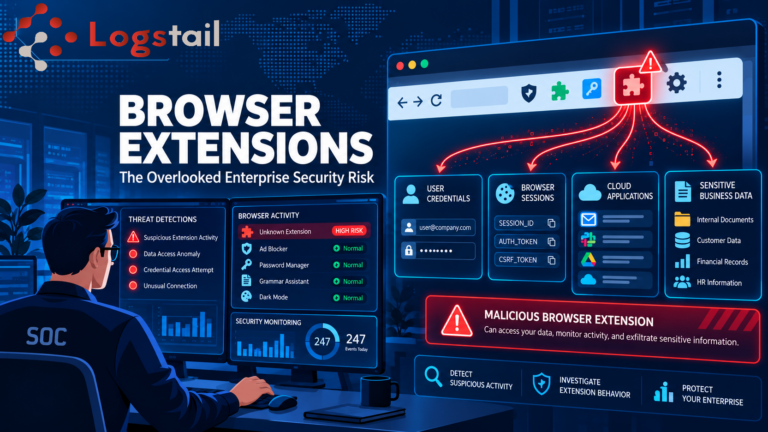
When the Browser Becomes the Threat: The Hidden Risks of Browser Extensions
Why Browser Extensions Deserve More Security Attention
Browser extensions have become a standard part of modern work environments. Employees use them to manage passwords, improve productivity, access AI-powered tools, take notes, block advertisements, and interact with cloud applications. In many organizations, browser extensions have become so common that they attract far less scrutiny than traditional software installations. However, browser extensions often operate with significant permissions inside the browser, allowing them to access websites, sessions, authentication tokens, and sensitive business information. Because most users trust extensions they install themselves, these tools can become an attractive target for attackers seeking access to enterprise environments. While organizations routinely monitor endpoints, identities, and cloud services, browser extensions frequently exist in a blind spot. Understanding their risks is becoming increasingly important as more business operations move into browser-based applications.
Why Browser Extension Security Matters
Unlike traditional applications, browser extensions operate directly inside the user’s browsing environment. This means they often have visibility into the same applications employees use every day, including email platforms, cloud storage systems, customer relationship management tools, collaboration platforms, and administrative portals. Depending on the permissions granted during installation, extensions may be able to:
- Read webpage content
- Modify webpage content
- Access browser sessions
- Monitor browsing activity
- Interact with authentication workflows
- Communicate with external servers
Many users install extensions without carefully reviewing requested permissions. In enterprise environments, this can create unnecessary exposure, especially when extensions gain access to sensitive information that would normally be protected by multiple layers of security controls. A browser extension does not need to exploit a vulnerability to become dangerous. In many cases, the permissions granted by the user are enough to create risk.
How Attackers Abuse Browser Extensions
Browser extension abuse typically follows several common patterns. Some involve malicious extensions, while others originate from legitimate extensions that become compromised over time.
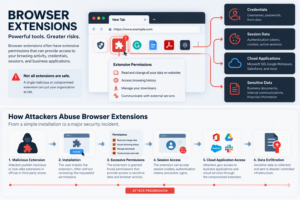
Malicious Extensions
Attackers sometimes publish browser extensions that appear completely legitimate. Examples may include:
- Productivity tools
- AI assistants
- PDF utilities
- Ad blockers
- Shopping tools
- Browser customization extensions
Once installed, these extensions can begin collecting information, monitoring user activity, or communicating with attacker-controlled infrastructure while appearing to operate normally. Because browser extension marketplaces contain thousands of applications, identifying malicious submissions remains an ongoing challenge.
Compromised Extensions
Not every risky extension starts out malicious. In some cases, attackers compromise:
- Extension developer accounts
- Update mechanisms
- Software supply chains
Once an attacker gains control, a trusted extension can begin distributing malicious updates to existing users. This type of attack can be particularly dangerous because organizations may already trust the extension and have deployed it across multiple systems.
Excessive Permissions
Many browser extensions request broader permissions than necessary. For example, a simple utility extension may request:
- Access to all browsing activity
- Permission to read website data
- Access to browser history
- Ability to modify webpage content
Even if the extension is legitimate, excessive permissions increase organizational risk and create additional opportunities for misuse or compromise.
The Enterprise Impact
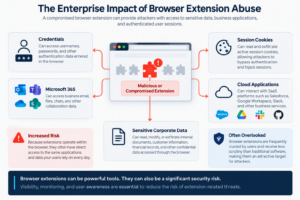
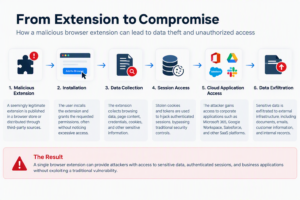
When browser extensions become malicious or are compromised by attackers, the consequences can extend far beyond the browser itself. Potential risks include:
- Credential theft
- Session cookie theft
- Authentication token abuse
- Data exfiltration
- Unauthorized cloud access
- Corporate data exposure
- Business application compromise
In some scenarios, attackers do not need to steal passwords at all. By abusing authenticated browser sessions, attackers may gain access to applications and services that have already been approved by the user. This can make detection significantly more difficult, particularly when the activity appears to originate from legitimate sessions. As organizations increasingly rely on browser-based applications such as Microsoft 365, Salesforce, Google Workspace, and cloud administration portals, the browser itself becomes a valuable attack surface.
Common Indicators of Extension-Related Threats
- Unexpected browser extension installations
- Unauthorized extension updates
- Suspicious outbound network connections
- Browser processes communicating with unknown domains
- Authentication anomalies
- Unusual cloud application access
- Session activity from unexpected locations
- Data transfers originating from browsers
Many of the indicators discussed in our article about early signs of a cyber attack can also appear during browser-based compromise activity and should be investigated carefully when they occur together. Viewed independently, these events may appear low risk. When correlated into a timeline, however, they can reveal a much larger security incident.
Detecting Extension Abuse with Logstail SIEM
- Endpoints
- Active Directory
- Microsoft 365
- Identity providers
- Cloud services
- Security products
- Suspicious browser activity
- Potentially compromised sessions
- Authentication anomalies
- Attack progression
- High-risk incidents
Rather than investigating isolated events, analysts gain a broader understanding of how browser activity, authentication events, endpoint telemetry, and cloud access patterns connect together. Organizations interested in improving overall visibility may also benefit from our article on SIEM integrations and security visibility, which discusses the importance of centralizing security telemetry.
Responding to Browser-Based Threats
Furthermore, once suspicious activity is identified, organizations need to understand both the scope and impact of the incident. Investigators should ask:
- Which users are affected?
- Which extensions were installed?
- What permissions were granted?
- Were credentials exposed?
- Were sessions abused?
- Was sensitive data accessed?
- Are additional systems affected?
Answering these questions quickly is essential for containing browser-based threats before they spread further throughout the environment.
Automating Response with Logstail SOAR
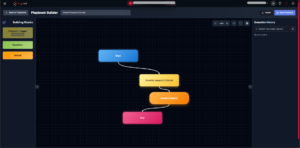
Detection is only the first stage of the response process. Using Logstail SOAR, organizations can automate investigation and response workflows once suspicious activity is detected. Depending on the nature of the incident, automated workflows can assist security teams by:
- Creating incident tickets
- Notifying security personnel
- Escalating investigations
- Triggering containment actions
- Isolating affected systems
- Initiating response procedures
Automation helps reduce response times and improves consistency across security operations. Organizations that already monitor authentication, endpoint, and administrative activity can strengthen their visibility by correlating identity-related events across multiple systems. Similar detection and investigation techniques are discussed in our article about detecting and responding to PowerShell-based attacks, where seemingly routine activity can reveal signs of compromise.
Best Practices for Browser Extension Security
Reducing browser extension risk requires a combination of technical controls, monitoring, and user awareness. Organizations should consider implementing the following practices:
- Restrict extension installations
- Maintain approved extension lists
- Review extension permissions regularly
- Remove unused extensions
- Monitor browser-related activity
- Educate users about extension risks
- Review extensions before enterprise deployment
- Correlate browser activity with identity and endpoint telemetry
These controls help reduce the likelihood of browser extensions becoming an overlooked attack vector.
Conclusion
Browser extensions are often trusted by users and overlooked by security teams. While security teams may not always be able to directly identify a malicious extension, the activities generated by compromised or overly permissive extensions often produce observable indicators across multiple security data sources. At the same time, browser extensions may possess extensive permissions that provide access to browser sessions, cloud applications, business data, and authentication workflows. As organizations continue to move toward browser-centric environments, browser extensions deserve the same level of scrutiny applied to endpoints, identities, and cloud services. With continuous monitoring, effective investigation capabilities, and automated response workflows, organizations can reduce the risks associated with browser-based threats and improve security visibility across the environment. The Logstail Security Suite, including Logstail SIEM and Logstail SOAR, helps security teams investigate suspicious activity, improve visibility, and respond more effectively to emerging threats.