
Unix Agent
Use the Linux or Unix agent to monitor Linux-based systems and collect logs, metrics, network packets, and security events.
Linux and Unix Requirements
Before installing the Linux or Unix agent, confirm that the system has:
Download and Run the Linux or Unix Agent
Install Python 3 if it is not already installed.
Then download the Logstail Agent using the command shown in the Logstail Agent dialog.
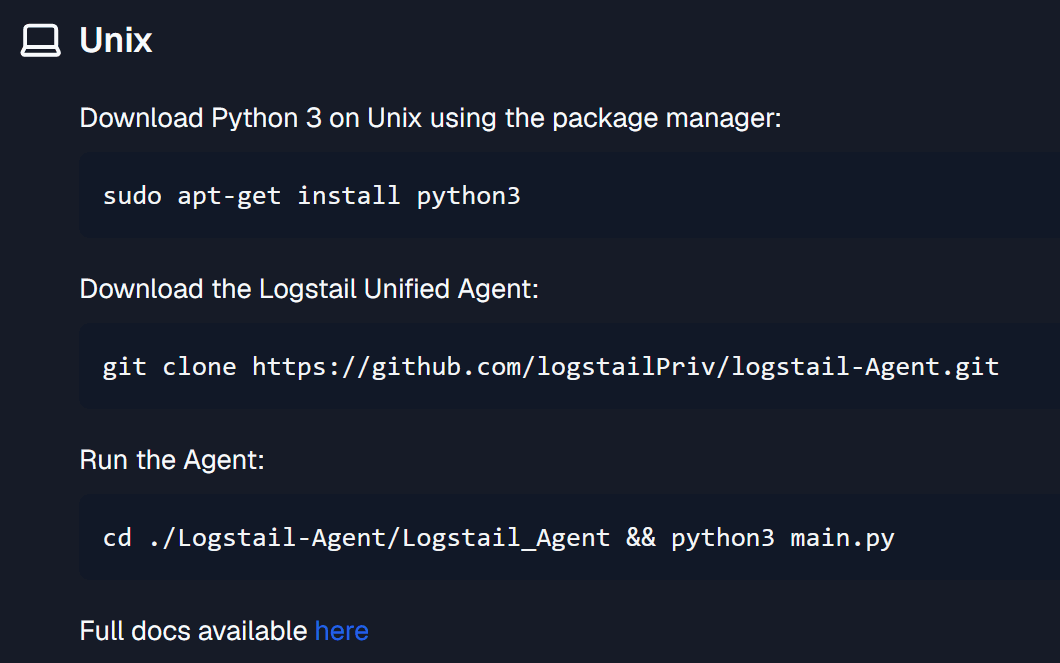
Configure the Unix Agent
Available Collector Actions
The Linux or Unix agent provides actions for installing, checking, configuring, restarting, or removing collectors.
Use these actions to manage the collector lifecycle, validate collector health, and control which modules collect data from the endpoint.
Install
Installs the selected collector on the system and enables it. Before installing a collector, make sure the Logstail Client Token has been copied from your Logstail account. You can find the token in My Account → Account. The token is used to connect the collector to the Logstail Platform.
Status
Prints the current status of the selected collector. If the status is OK or RUNNING, the collector is active and ready. If the collector is not running, review the configuration first. If the issue cannot be resolved, contact Logstail Support.
Show modules
Prints all available modules for the selected collector and shows whether each module is enabled or disabled. Use this action before enabling or disabling modules so you can confirm which modules are available.
Enable module
Enables a module on the selected collector. Before enabling a module, run Show modules to review the available modules and their current status. Some modules require extra configuration before they can collect data correctly.
After enabling a module:
If the dashboard is empty, review the module configuration and confirm that data is being shipped to Logstail.
Disable module
Disables an already enabled module. After disabling a module, data related to that module will no longer be collected or shipped to the Logstail Platform. Use this action when a module is no longer needed or should be removed from the endpoint collection scope.
Restart Collector
Restarts the selected collector. Use this action when the collector configuration was changed manually, a module was enabled or disabled, data is not being shipped, the collector status does not look healthy, or a configuration change needs to be applied. After restarting, check the collector status and verify data in Logstail.
Uninstall
Uninstalls the selected collector from the system. After uninstalling a collector, any data related to that collector will stop being shipped to the Logstail Platform. Use this action only when the collector is no longer required on the endpoint.
Recommended Unix Collectors
Logs Collector
The Logs Collector gathers log files, parses them, and forwards the data to Logstail. Use this collector when you want to centralize and analyze logs from systems, applications, or services in dashboards, reports, or workflows.
Metrics Collector
The Metrics Collector collects system and service metrics from the endpoint. Use this collector to monitor performance, resource usage and overall infrastructure health across servers, containers, and applications.
Packets Collector
The Packets Collector captures network traffic and extracts metadata from protocols such as HTTP, DNS, and TCP. Use this collector for network visibility, troubleshooting, and security investigations at the endpoint level.
SIEM Collector
The SIEM Collector enables real-time threat detection, log analysis, and incident response. Use this collector when the endpoint should perform security monitoring, detect vulnerabilities, and send SIEM telemetry to Logstail.
Linux and Unix Collectors and Modules
Linux and Unix collectors gather logs, metrics, packets, and security events from the endpoint.
Verify Data Collection
After installing the agent and collectors, verify that endpoint data is flowing into Logstail.
If data does not appear, check:
Recommended First Setup
Security Best Practices
Use approved systems
Install the agent only on approved systems.
Limit admin privileges
Use administrator or root privileges only when required.
Protect credentials
Keep tokens and enterprise keys protected.
Avoid credential sharing
Do not share credentials in tickets, screenshots, or public channels.
Use least privilege
Use the lowest required permissions for module credentials.
Restart after changes
Restart collectors after configuration changes.
Validate data flow
Validate that data is flowing after every new collector installation.
Verify host settings
For on-premise deployments, verify the correct host or server IP before entering credentials.
Clean up unused components
Remove unused collectors or modules when they are no longer needed.
Related Pages
| Page | Description |
|---|---|
| Agents | Confirm that the Linux or Unix endpoint appears in the agent inventory and check agent health, status, version, and last seen time. |
| Discover | Validate that Linux or Unix logs, metrics, network packets, and SIEM telemetry are arriving. |
| Dashboards | Review collected Linux or Unix data through visual dashboards. |
| Pre-Built Dashboards | Add dashboards related to Linux logs, metrics, packets, SIEM telemetry, or enabled modules. |
| Alerts | Review alerts generated from Linux or Unix telemetry and SIEM detections. |
| Cases | Group related Linux or Unix alerts into investigation cases. |
| Monitors | Create detection rules that evaluate Linux or Unix data and generate alerts. |
| Playbooks | Automate response actions for Linux or Unix-related alerts and incidents. |