Multi-Tenant Administration
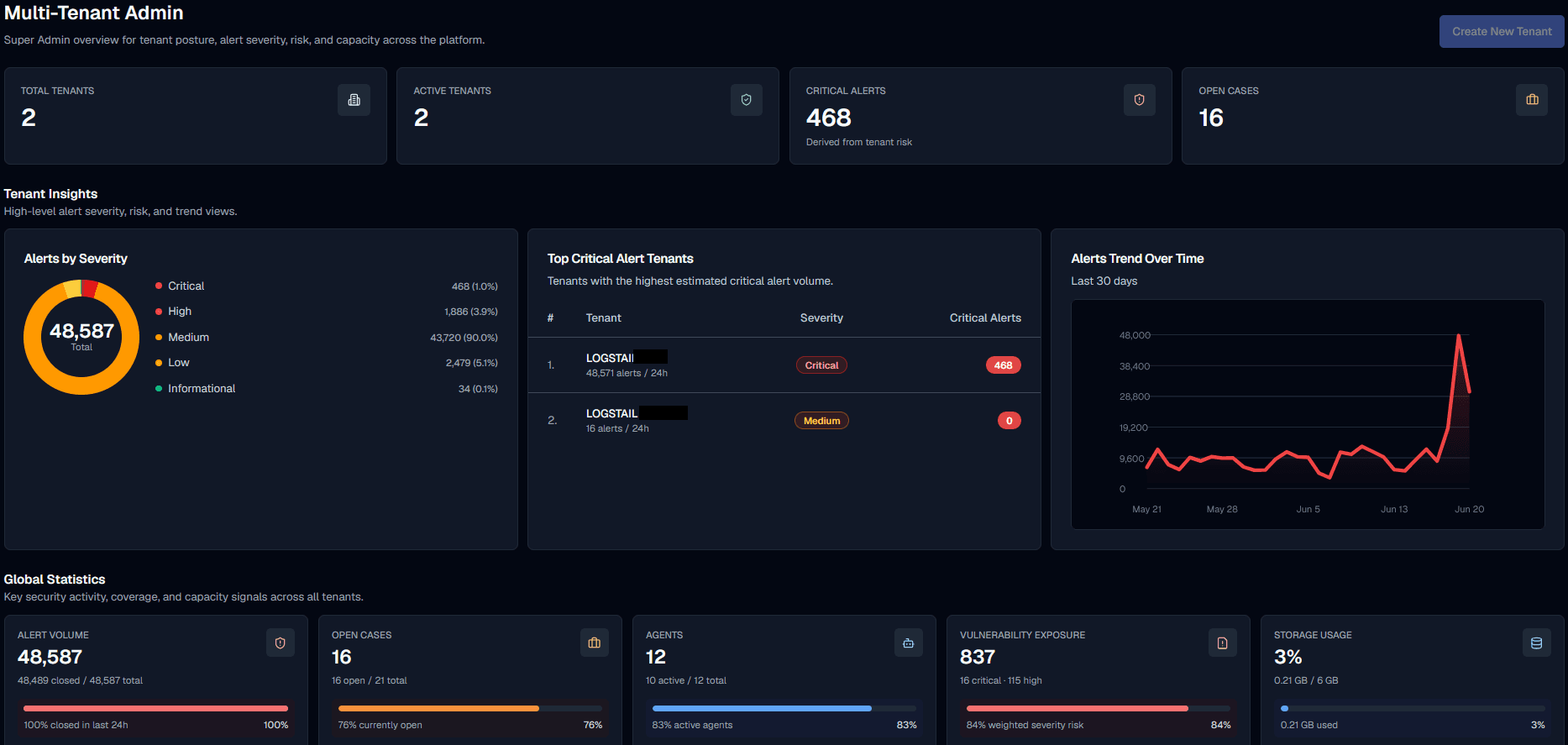
The Multi-Tenant Admin view gives Super Admins a cross-tenant command center for tenant posture, alert severity, risk, open cases, agent coverage, vulnerability exposure, data retention, daily usage, and storage capacity.
Use this page to quickly understand tenant posture, identify accounts that need attention, and jump into a tenant’s dedicated view when deeper investigation is required.
Where to find it
Open the main navigation menu and go to:
Navigation path
Application route
/multitenant-adminOperational note
Multi-tenant views are designed for privileged users. If a user cannot see these pages, validate their role, stack access, plan state, and account status first.
What this page is used for
The Multi-Tenant Admin page is intended for privileged users who manage or monitor multiple tenant environments from one place.
Super Admins
Monitor all tenants, create new tenants, review global metrics, and identify tenants that need attention.
SOC Operators
Track alert pressure across tenants and quickly jump into the affected tenant for triage.
Senior SOC Analysts
Review critical alert activity, open cases, vulnerability exposure, and tenant risk before deeper investigation.
Platform Admins
Validate tenant plan usage, data retention, daily usage, storage capacity, and agent coverage.
Incident Response Leads
Identify tenants with active cases or critical alerts and coordinate response from the correct tenant context.
How to use this page
Available pages
Operational note
The Multi-Tenant Admin navigation includes access to Multi-Tenant Alerts and Multi-Tenant Cases. These pages provide cross-tenant views for reviewing alerts and cases from all tenants the administrator is allowed to manage.
Multi-tenant pages
These pages provide cross-tenant visibility, alert triage, and case management capabilities across all tenant environments.
| Page | Product route | Purpose |
|---|---|---|
| Multi-Tenant Admin | /multitenant-admin | Cross-tenant command center for tenant posture, alert severity, risk, capacity, open cases, agent coverage, vulnerability exposure, data retention, and daily usage. |
| Multi-Tenant Alerts | /soar/alert-management-multitenant | Shows alerts across all tenants the administrator is allowed to manage. Administrators can review and perform alert actions using the same concepts described in the SOAR Alerts page. |
| Multi-Tenant Cases | /soar/case-management-multitenant | Shows cases across all tenants the administrator is allowed to manage. Administrators can review and perform case actions using the same concepts described in the SOAR Cases page. |
Top-level metrics
Platform overview metrics
At the top of the page, users can quickly review platform-wide totals and understand overall tenant activity and workload.
| Metric card | What it shows |
|---|---|
| Total Tenants | Total number of tenant environments available in the platform. |
| Active Tenants | Tenants currently active and operational. |
| Critical Alerts | Critical alert count derived from tenant risk and alert activity. |
| Open Cases | Active investigation cases across tenants. |
The page also includes a Create New Tenant action in the top-right corner for adding a tenant from the admin view.
Tenant insights
Tenant Insights overview
The Tenant Insights area provides high-level alert severity, risk, and trend views to help users quickly identify critical activity across tenants.
| Area | What it shows |
|---|---|
| Alerts by Severity | Donut chart showing alert distribution by Critical, High, Medium, Low, and Informational severity. |
| Top Critical Alert Tenants | Ranked tenants with the highest estimated critical alert volume. |
| Alerts Trend Over Time | Time-series chart showing alert activity over the last 30 days. |
Global statistics
Global statistics overview
The Global Statistics section summarizes key security, coverage, and capacity signals across all tenants.
| Statistic | What it helps you understand |
|---|---|
| Alert Volume | Total alert volume and recent closure percentage. |
| Open Cases | Open case count and current case workload. |
| Agents | Active agent coverage across tenants. |
| Vulnerability Exposure | Weighted vulnerability risk across tenants. |
| Storage Usage | Total data used compared with available tenant storage capacity. |
Tenants table
Tenants table overview
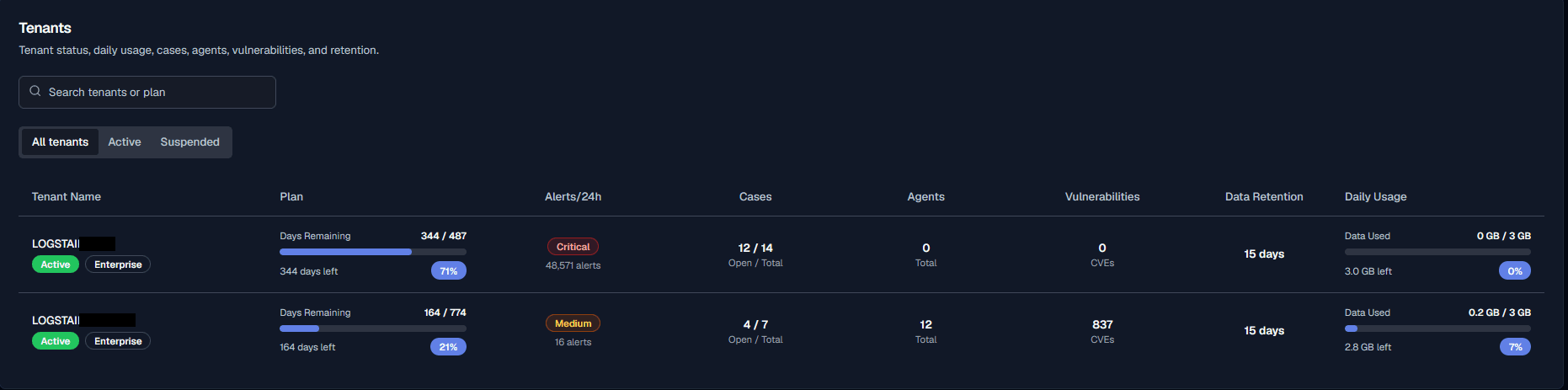
The Tenants table is the main place to compare tenant status, plan, daily usage, cases, agents, vulnerabilities, and retention. You can search tenants or plans and filter results using All tenants, Active, and Suspended tabs.
| Column | Meaning |
|---|---|
| Tenant Name | Tenant name, lifecycle badge, and plan badge. |
| Plan | Subscription plan usage, days remaining, and plan capacity progress. |
| Alerts/24h | Tenant alert volume in the last 24 hours, including severity indicator. |
| Cases | Open and total cases for the tenant. |
| Agents | Total agents associated with the tenant. |
| Vulnerabilities | Total CVEs or vulnerability findings associated with the tenant. |
| Data Retention | Retention period for tenant data. |
| Daily Usage | Current daily data usage compared with the tenant limit. |
View specific tenant
From the Tenants table, press a tenant row to quickly open that tenant’s dedicated view.
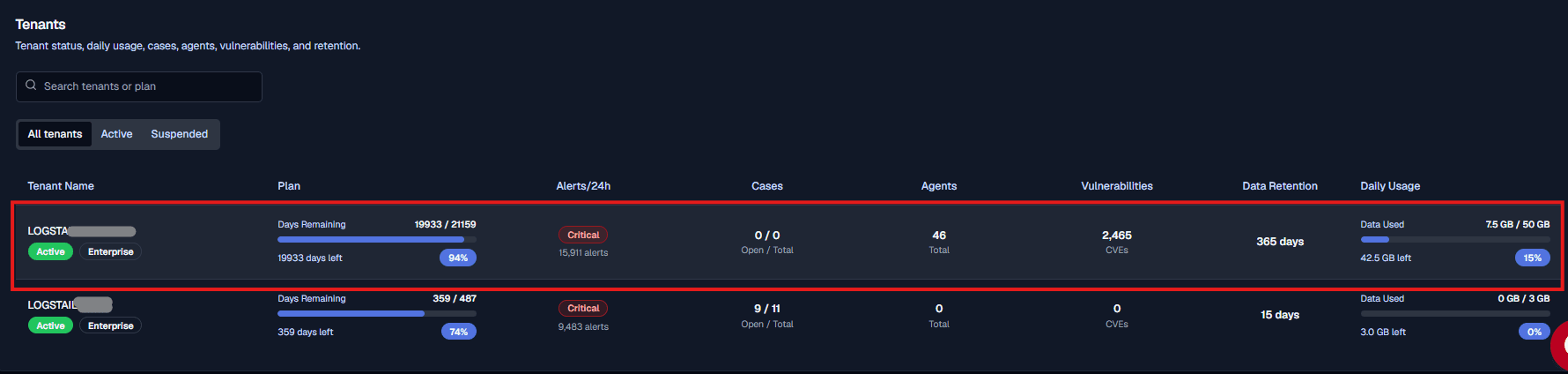
When you enter a specific tenant view, Logstail shows a tenant context bar at the top of the page. This bar indicates that you are currently working inside a specific tenant environment.

Use Exit in the tenant context bar to leave the tenant view and return to the Multi-Tenant Admin view.
Operational note
When working inside a specific tenant view, use the tenant context bar to confirm which tenant is active. Press Exit to leave the tenant context and return to the Multi-Tenant Admin view.
This is useful when the overview shows high alert volume, critical severity, open cases, low agent coverage, vulnerability exposure, retention pressure, or high daily usage.
After entering the tenant view, continue the investigation from that tenant’s own context, including its dashboards, alerts, cases, agents, vulnerabilities, retention, and usage data.
Creating a tenant
Use Create New Tenant from the top-right of the Multi-Tenant Admin view to start adding a new tenant environment.

Recommended workflow
Key concepts
Tenant
A tenant is a customer or organization environment managed under the multi-tenant view. Tenant rows include name, lifecycle status, plan, alerts, cases, agents, vulnerabilities, retention, and usage.
Tenant view
A tenant view is the dedicated workspace for one tenant, where you can work with dashboards, alerts, cases, agents, vulnerabilities, retention, and usage data.
Lifecycle status
Shows whether a tenant is usable or restricted, such as Active or Suspended. Use status tabs to separate operational tenants from those needing review.
Alert severity
Helps prioritize investigation by grouping alerts into Critical, High, Medium, Low, and Informational levels.
Open cases
Represents active investigations. A high number of open cases may indicate the need for SOC attention or escalation.
Vulnerability exposure
Summarizes vulnerability risk across tenant assets. Use alongside alerts and cases to assess overall risk.
Data retention
Defines how long tenant data is available for search, investigation, reporting, and compliance.
Daily usage
Shows data consumption versus daily limits. High usage may indicate growth, misconfigurations, or nearing capacity.
Risk
Used to prioritize tenant review based on alerts, vulnerabilities, incidents, cases, and operational state.
Alert triage
Process of reviewing detections, validating them, assigning ownership, linking to cases, and handling false positives.
Related pages
Use these pages when you need to continue the workflow from the Multi-Tenant Admin view.
| Page | Description |
|---|---|
| SOAR Alerts | Use this for standard alert management inside the active tenant context. |
| SOAR Cases | Use this for case handling inside the active tenant context. |
| Security Agents | Use this to review endpoint coverage, agent health, vulnerabilities, issues, updates, and software inventory. |
| Reports | Use this when you need scheduled reports, exports, or stakeholder-ready security summaries. |