Compliance
The Compliance page provides Governance, Risk, and Compliance visibility for the Logstail SIEM SOAR platform. It helps security teams manage assets, threats, vulnerabilities, controls, risk, and compliance dashboards from a centralized workspace.
Where to Find It
Open the main navigation menu and go to: Security → Compliance to access governance, risk, and compliance data and dashboards.
Sidebar path
Route path
/security/grcWhat This Page Is Used For
Use the Compliance page to manage governance, risk, and compliance workflows across your environment.
Manage GRC data
Centralize governance, risk, and compliance information.
Review assets & risks
Analyze assets, threats, vulnerabilities, and controls.
Maintain a risk register
Track and update organizational risks.
Monitor dashboards
View compliance and risk dashboards for visibility.
Refresh GRC data
Update compliance and risk information as needed.
Support audits
Prepare documentation and evidence for audits.
Prioritize weaknesses
Identify and prioritize security gaps based on risk.
Access Notes
This page is restricted by role and plan. Visible allowed roles include Admin, Senior SOC Analyst and Auditor.
Who should use this page
Users that are suitable for using this page include:
Administrators
Review compliance visibility, permissions, and GRC data availability.
Senior SOC Analysts
Use risk, vulnerability, threat, and control context to support prioritization.
Auditors
Review dashboards, controls, risk register entries, and evidence for audit preparation.
GRC Teams
Maintain governance, risk, and compliance records.
Security Managers
Track compliance posture, risk trends, and remediation progress.
Vulnerability Management
Review weaknesses, affected assets, and risk impact.
Control Owners
Review assigned controls, control effectiveness, and missing safeguards.
Main Sections
The Compliance page includes tabs for:
Assets
Review assets, ownership, and relationships with threats, vulnerabilities, and controls.
Threats
Understand threat categories, impacted assets, and relationships to risks and controls.
Vulnerabilities
Review weaknesses, severity, affected assets, and remediation status.
Controls
Manage security controls, map them to risks, and evaluate effectiveness.
Risk Register
Track risks, assign ownership, monitor likelihood and impact, and manage mitigation.
Dashboard
View high-level compliance posture, risk trends, and key metrics.
A Refresh All Data action is available to reload GRC data.
Assets
The Assets tab is used to review and manage assets that are part of the organization’s security and compliance scope.
Use this tab to:
Assets represent endpoints, systems, services, applications, or other protected resources.
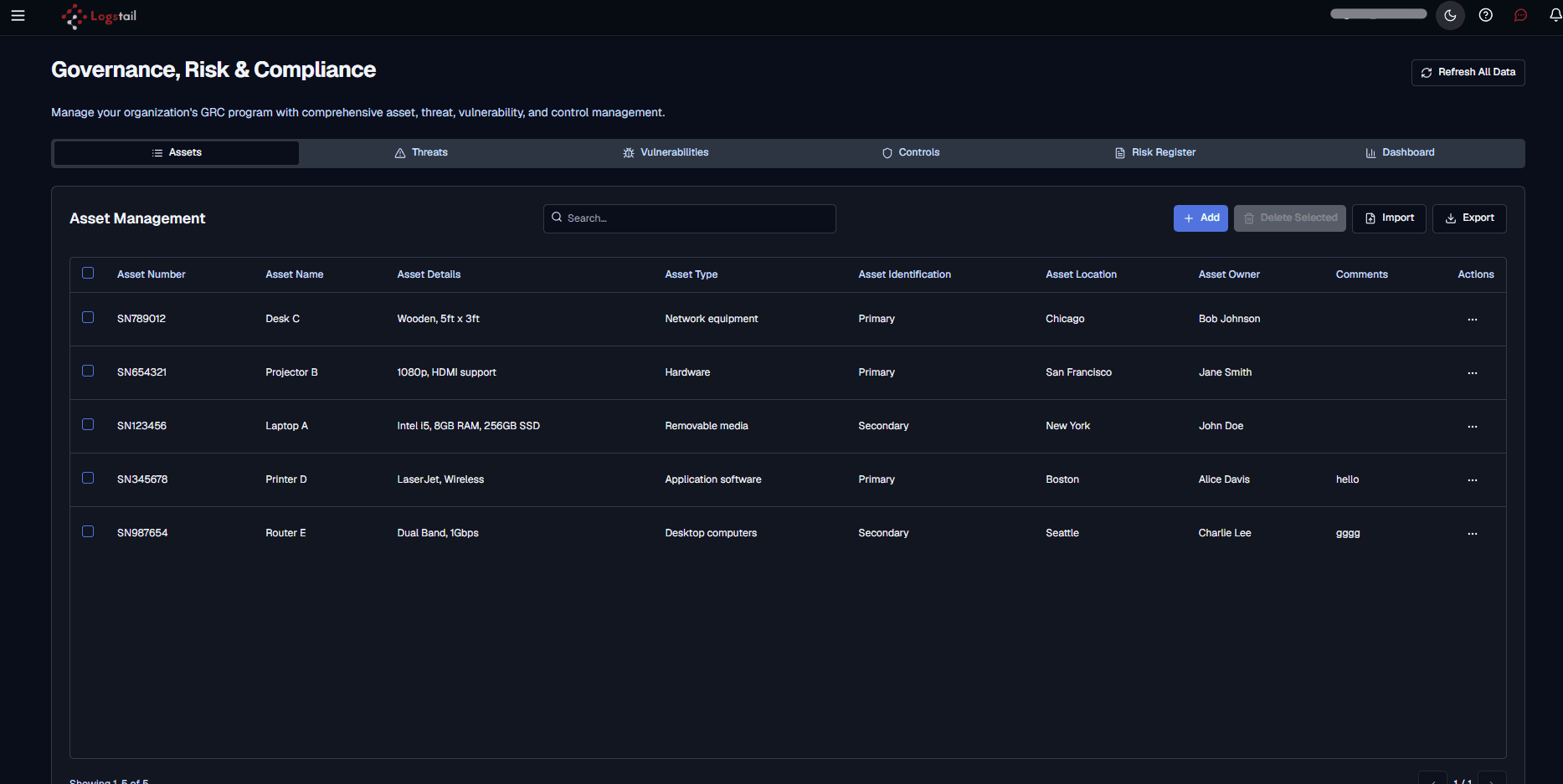
Available Actions
Search
Filters the asset table so users can quickly find a specific asset.
Add
Creates a custom asset record in the asset inventory.
Delete Selected
Deletes selected asset records when deletion is available.
Import
Imports asset records into the asset inventory.
Export
Exports asset records for review, reporting, or offline analysis.
Row actions
Opens record-level actions for the selected asset, such as editing or deleting the asset entry.
Threats
The Threats tab helps users manage threat records that may affect assets, risks, controls, or compliance posture.
Use this tab to:
Threat management helps teams move beyond raw alerts and understand business impact.
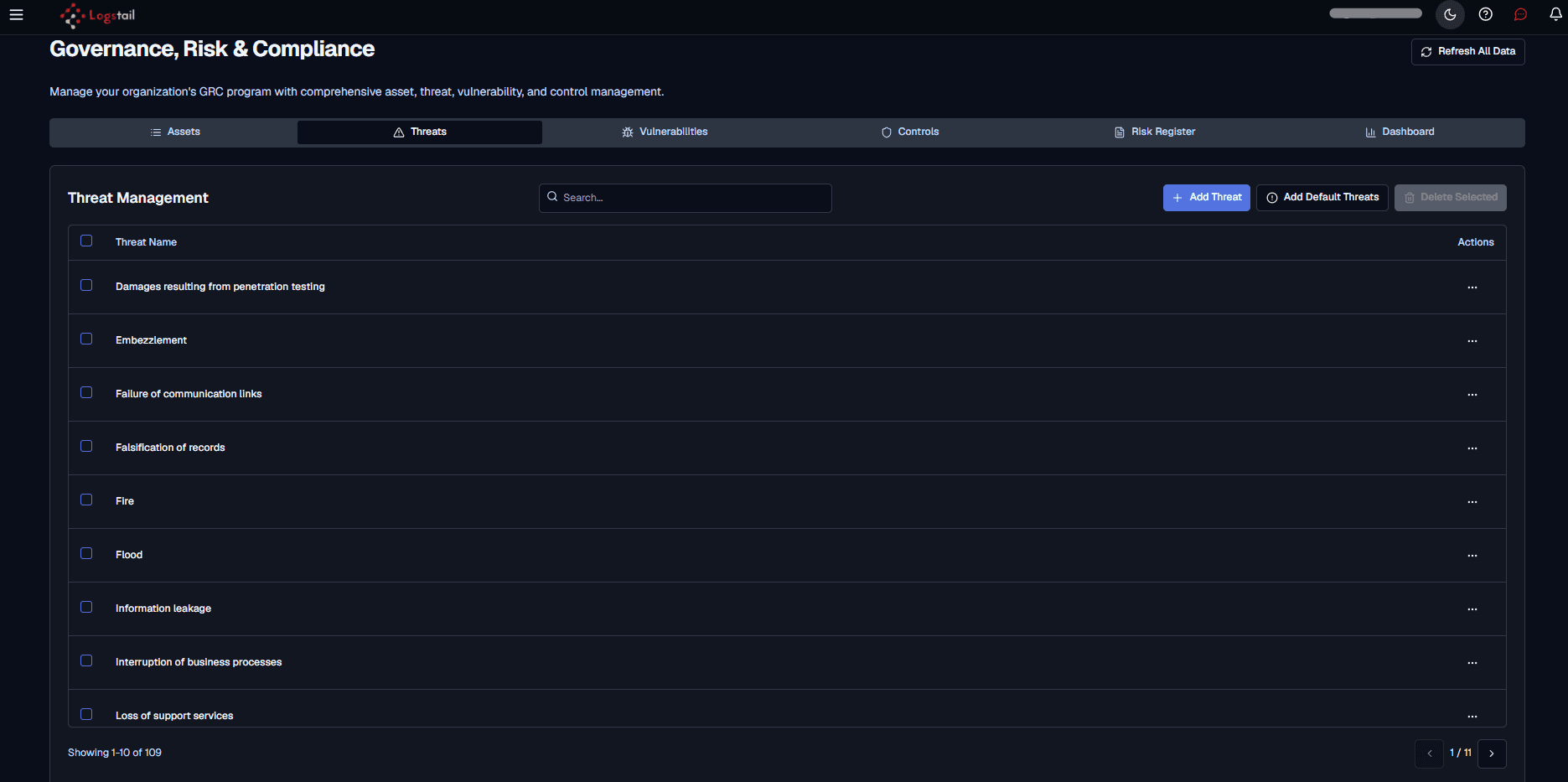
Available Actions
Search
Filters the threat table so users can quickly find a specific threat by name.
Add Threat
Creates a custom threat record for the GRC threat list.
Add Default Threats
Adds the default threat set to quickly populate the threat list.
Delete Selected
Deletes selected threat records when deletion is available.
Row actions
Opens record-level actions for the selected threat, such as editing or deleting the threat entry.
Vulnerabilities
The Vulnerabilities tab is used to manage vulnerability records that may affect assets, risks, controls, or compliance posture.
Use this tab to:
Vulnerability context helps teams reduce attack surface and prioritize high-risk remediation first.
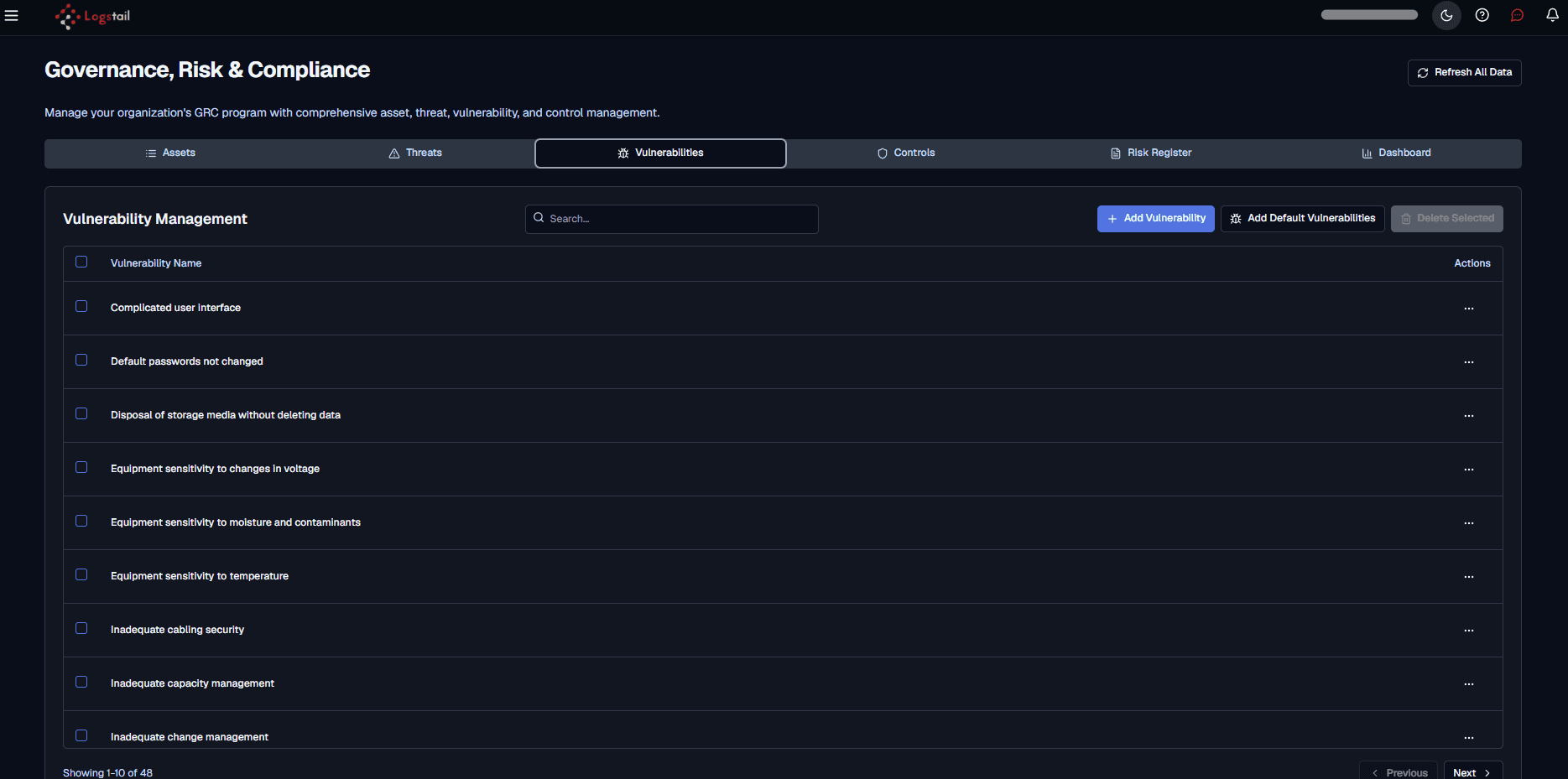
Available Actions
Add Vulnerability
Creates a custom vulnerability record that can be tracked in the GRC vulnerability list.
Add Default Vulnerabilities
Adds the default vulnerability set to help quickly populate the vulnerability register.
Delete Selected
Deletes selected vulnerability records when deletion is available.
Row actions
Opens record-level actions for the selected vulnerability, such as editing or deleting the vulnerability entry.
Search
Filters the vulnerability table so users can quickly find a specific vulnerability by name.
Controls
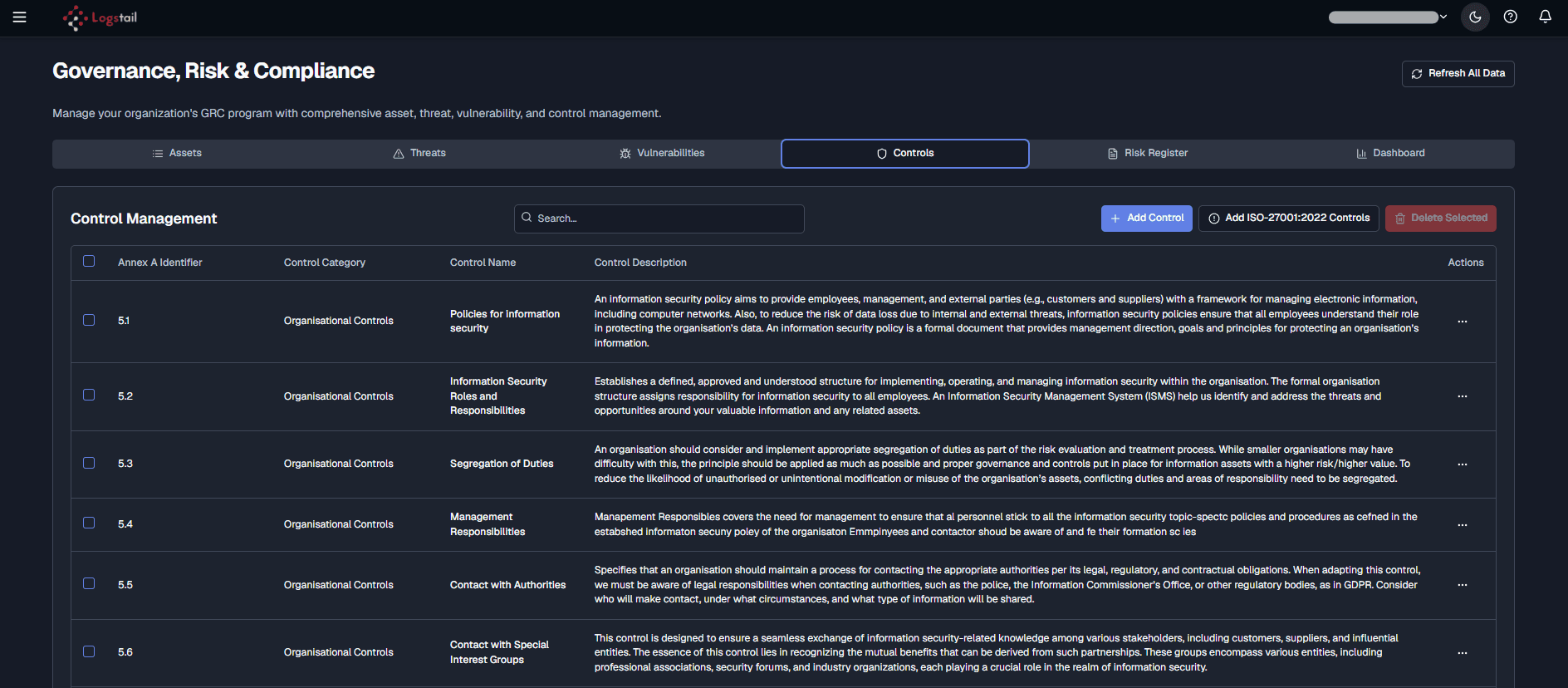
The Controls tab is used to review, add, import, and manage security controls that reduce risk or support compliance requirements.
This tab shows a control management table with each control’s Annex A identifier, category, name, description, and available actions.
Use this tab to:
Controls include technical, administrative, or procedural safeguards.
Available Actions
Add Control
Creates a custom control record.
Add ISO-27001:2022 Controls
Adds ISO 27001:2022 control records to the control list.
Delete Selected
Deletes selected controls when deletion is available.
Risk Register
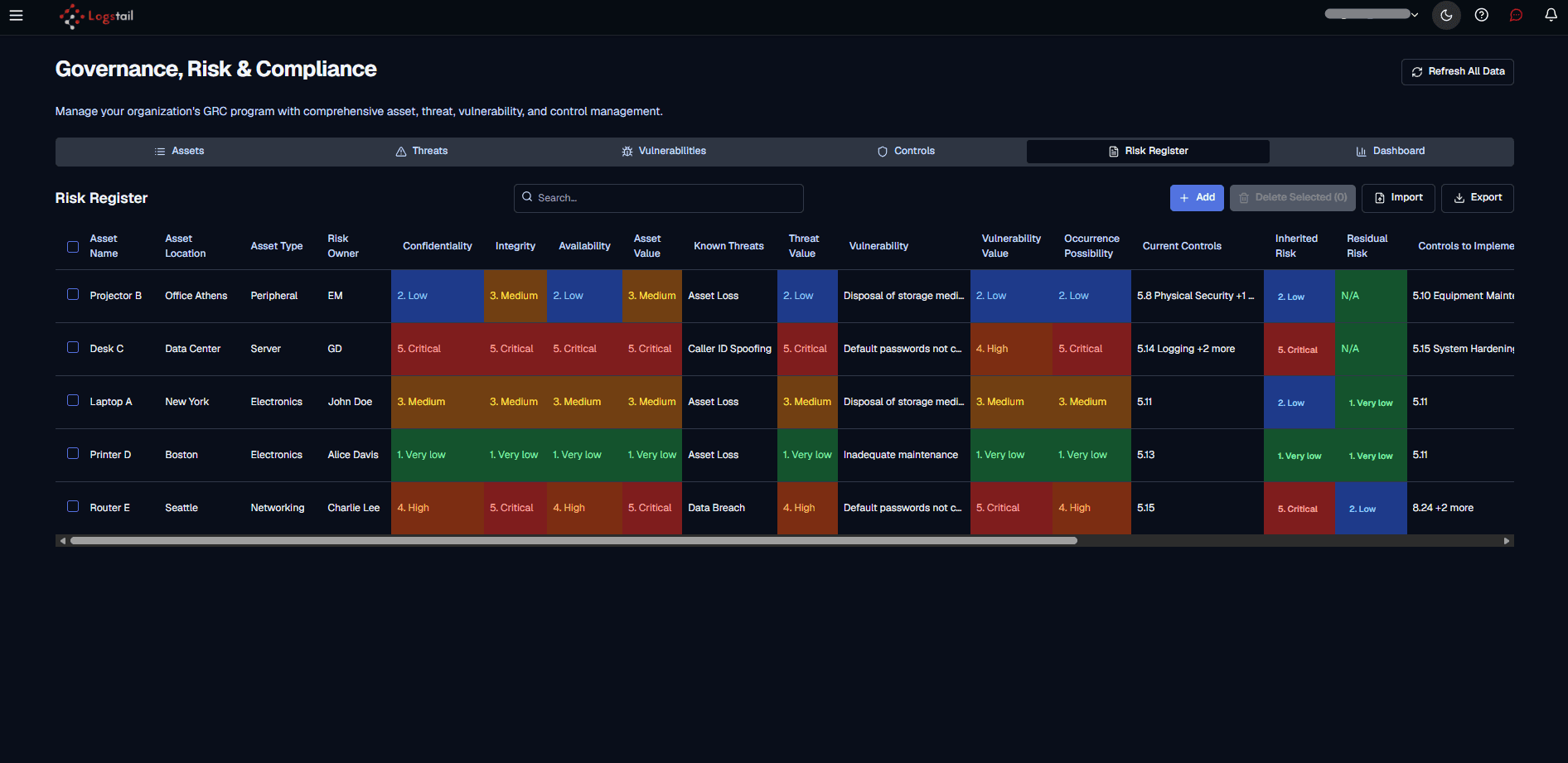
The Risk Register tab provides a structured view of tracked risks across assets, threats, vulnerabilities, controls, and residual risk.
Use the risk register to:
A strong risk register helps connect technical findings to business risk.
Available Actions
Search
Filters the risk register so users can quickly find risks by asset, owner, threat, vulnerability, or control context.
Add
Creates a new risk register entry.
Delete Selected
Deletes selected risk entries when deletion is available.
Import
Imports risk register records into the GRC workspace.
Export
Exports risk register data for reporting, audit evidence, or offline review.
Horizontal scroll
Scrolls across the table when additional risk fields are available outside the visible area.
Dashboard
The Dashboard tab summarizes GRC posture with high-level risk metrics, charts, and analysis views.
Use the dashboard to:
The dashboard includes three views:
Risk Overview
Shows high-level risk counts, risk score distribution, and risk treatment strategy charts.
Risk Heatmap
Shows risks plotted by impact and likelihood so teams can quickly identify high-priority risk areas.
Risk Analysis
Shows threat, vulnerability, and control summaries used in the risk register.
Risk Overview
The Risk Overview view provides a quick summary of the current risk posture.
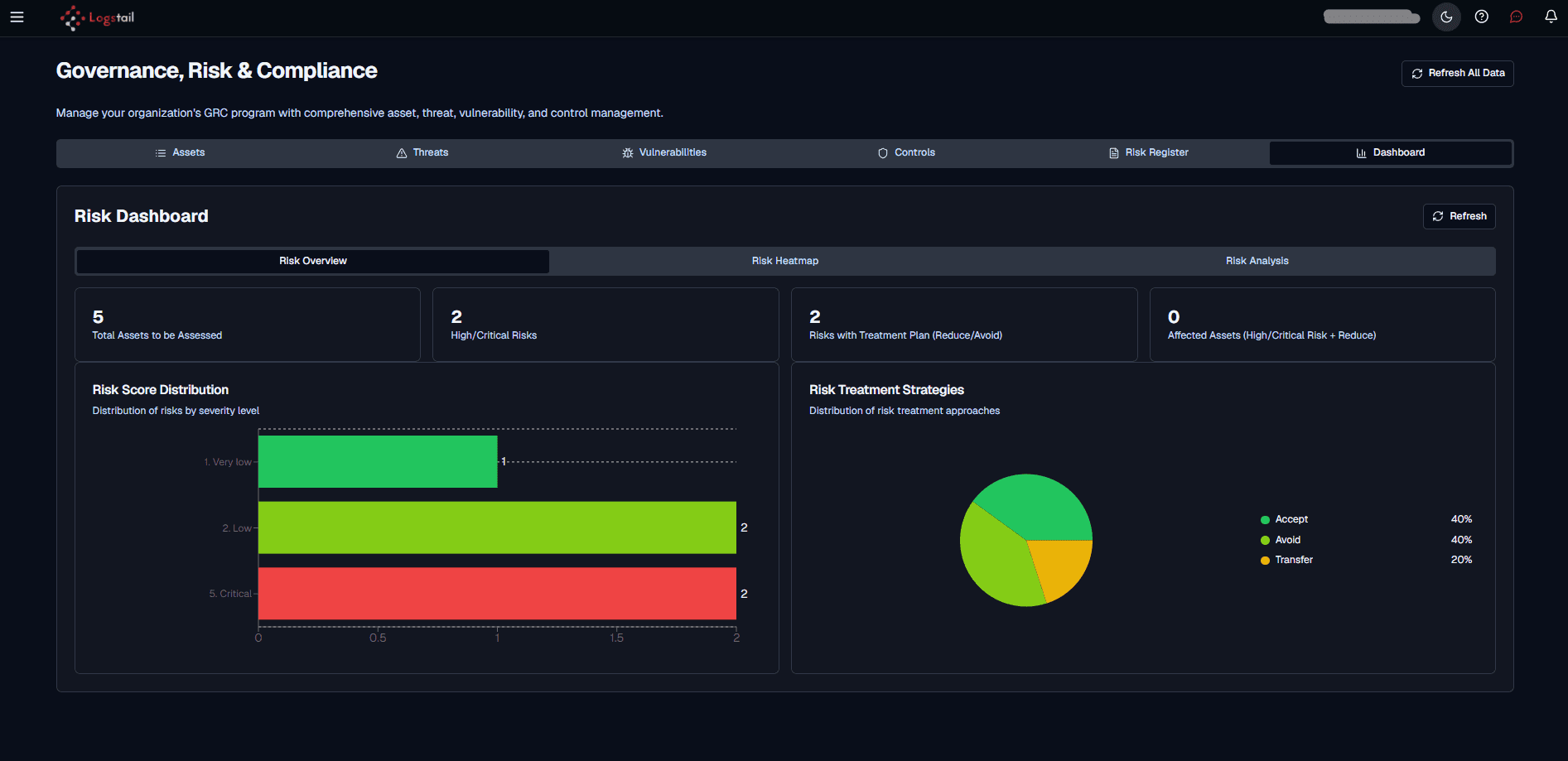
This view includes:
Risk Heatmap
The Risk Heatmap view shows the distribution of risks by impact and likelihood.
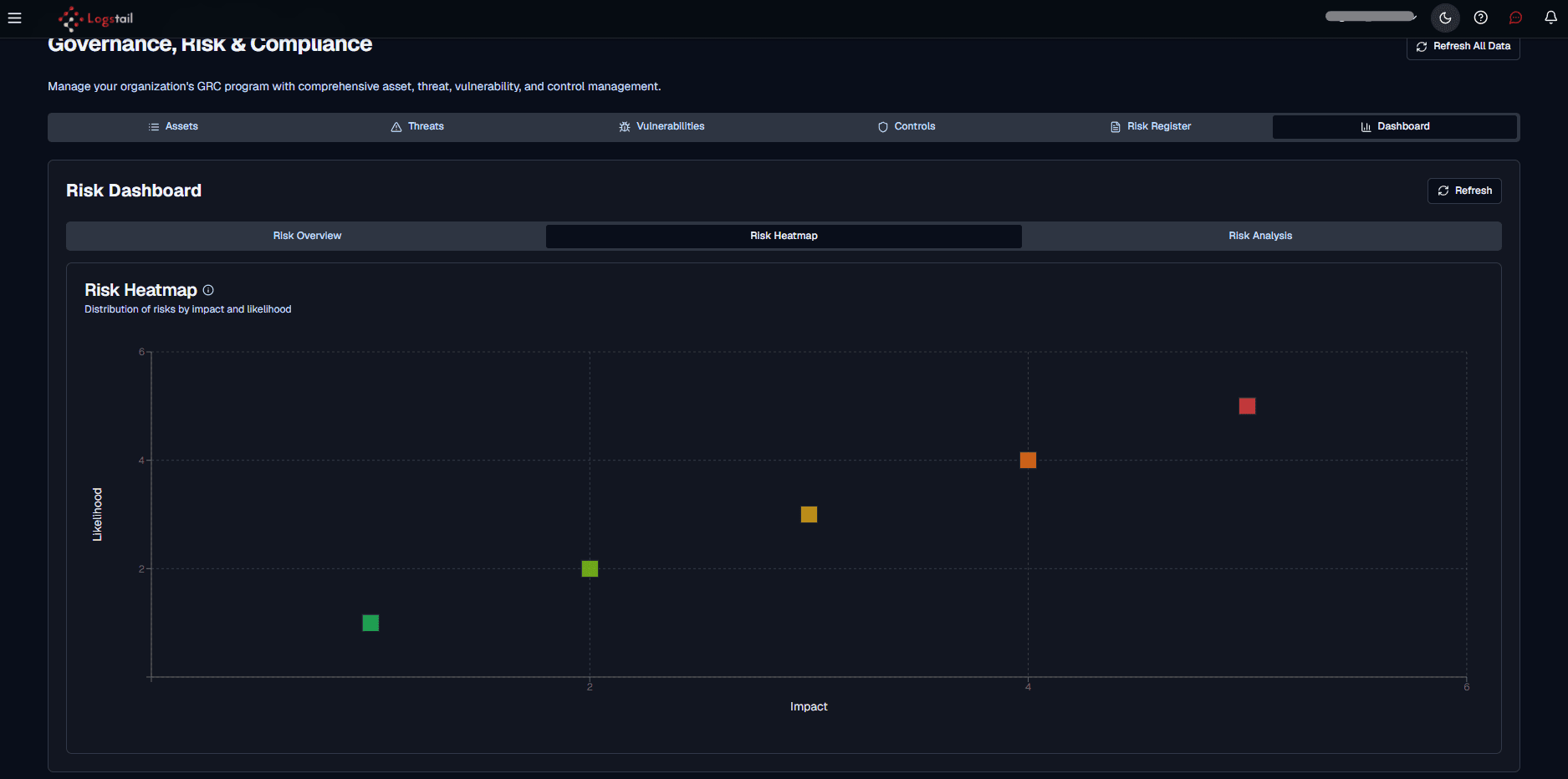
Use this view to identify risks that require priority review. Risks with higher impact and higher likelihood should usually be reviewed first.
Risk Analysis
The Risk Analysis view summarizes how threats, vulnerabilities, and controls are represented in the risk register.
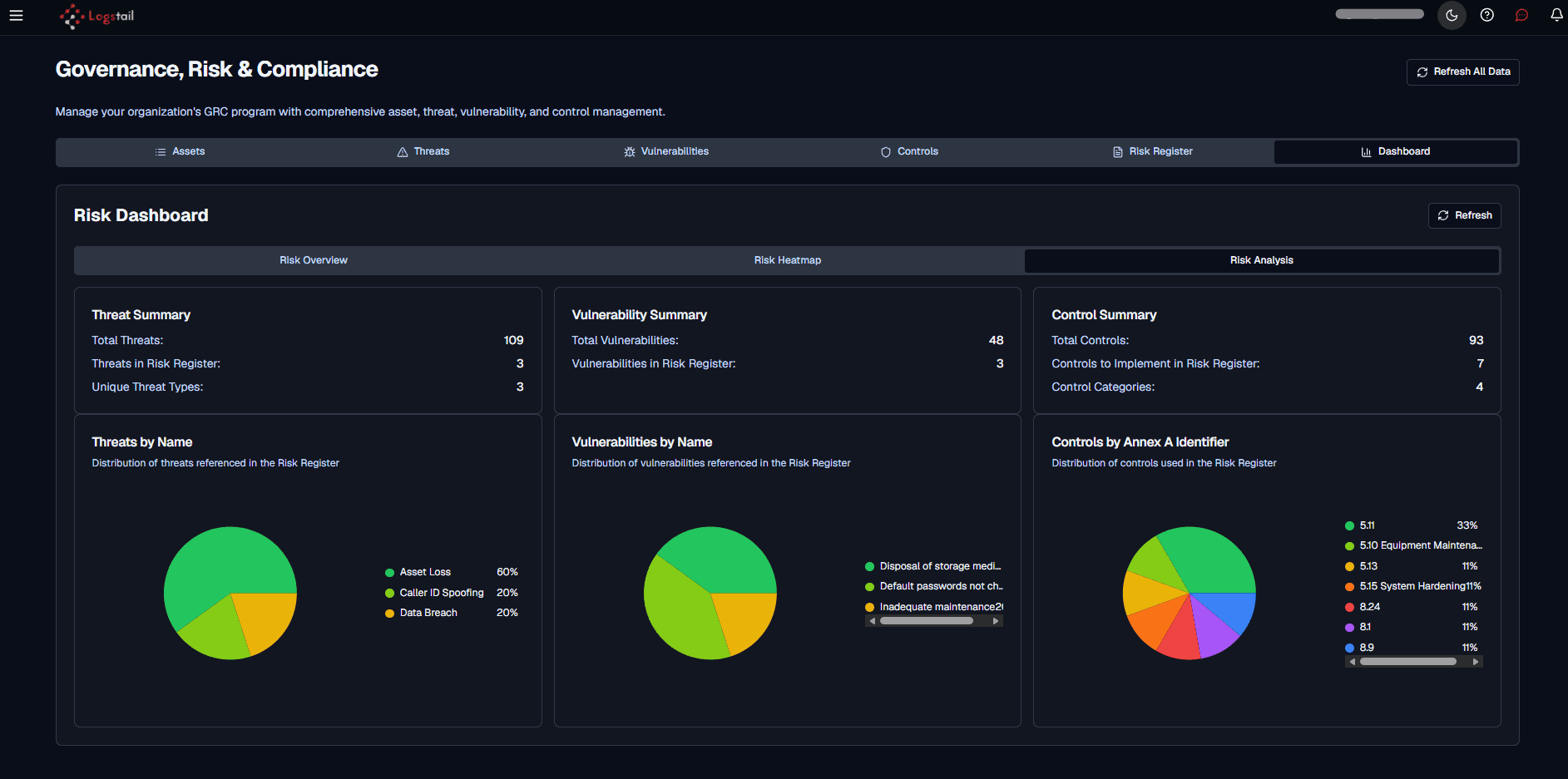
This view includes:
Threat Summary
Shows total threats, threats referenced in the risk register, and unique threat types.
Vulnerability Summary
Shows total vulnerabilities and vulnerabilities referenced in the risk register.
Control Summary
Shows total controls, controls to implement in the risk register, and control categories.
Threats by Name
Shows the distribution of threats referenced in the risk register.
Vulnerabilities by Name
Shows the distribution of vulnerabilities referenced in the risk register.
Controls by Annex A Identifier
Shows the distribution of controls used in the risk register by Annex A identifier.
Refresh All Data
The Refresh All Data action reloads compliance-related data across the GRC workspace.
Use it after:
Typical Compliance Workflow
Security Configuration Assessment Context
Logstail supports continuous assessment of endpoint configurations against security baselines. Configuration assessment can help identify deviations from expected secure settings and provide remediation guidance.
Compliance teams can use this information to:
Regulatory Compliance Context
Logstail helps organizations monitor and analyze security events that support compliance with frameworks such as GDPR, HIPAA, PCI DSS, and similar regulatory or industry standards.
The Compliance page should be used alongside dashboards, reports, Discover, and agent data to validate evidence and support compliance workflows.
Troubleshooting
Compliance page is not accessible
- 1
The current role or subscription may not have access.
- 2
Confirm the user has the correct permissions.
Data looks stale
- 1
Use Refresh All Data.
- 2
Recheck the relevant tab.
Risk or control is missing
- 1
Confirm the data source exists.
- 2
Confirm the item was created or imported correctly.
Vulnerability counts do not match Agents
- 1
Check filters, scope, and refresh state.
- 2
Agents and Compliance may represent data differently depending on context.
Dashboard does not reflect recent changes
- 1
Refresh data.
- 2
Confirm updates were saved successfully.
Best Practices
Keep assets updated
Keep asset records current.
Prioritize high risk
Review high-risk vulnerabilities first.
Map relationships
Map threats to controls and risks.
Maintain ownership
Maintain clear risk ownership.
Refresh before reviews
Refresh data before compliance reviews.
Support audits
Use reports and exports for audit evidence.